
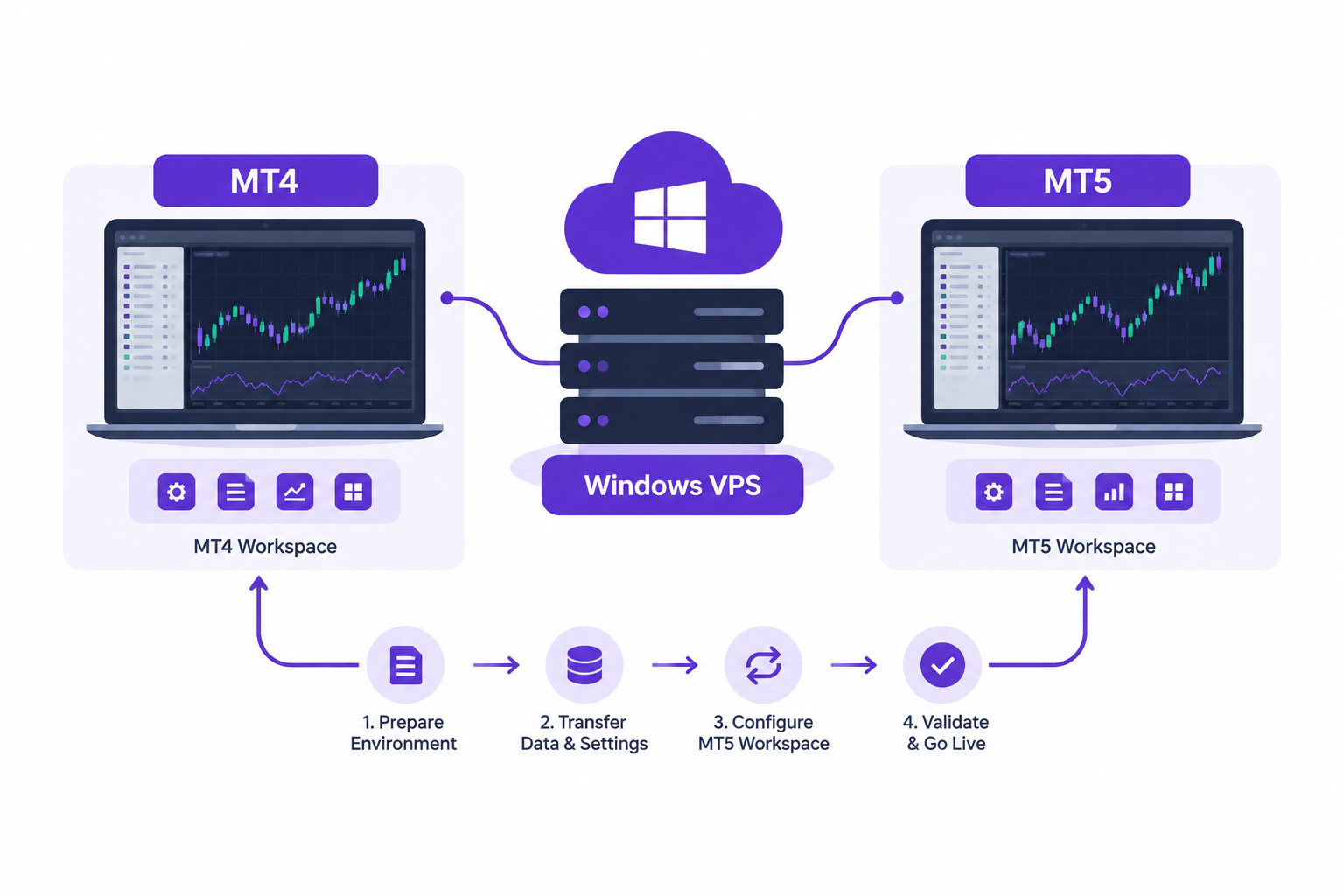
A forex VPS for MT5 after MT4 shutdown lets you prepare a new trading environment while keeping your existing MT4 setup accessible. Run both terminals on one Windows VPS, test MT5 separately, and move live trading only when your broker and strategy are ready.
AccuWeb Hosting Forex VPS plans start at $7.99 per month, at the same price on monthly, quarterly, and yearly billing. Every plan includes a 7-day money-back guarantee. Explore our Forex VPS hosting for the transition.
Key Takeaways
- MT4 retirement dates depend on the broker and entity, not a universal shutdown.
- Run MT4 and MT5 as separate applications on 1 Windows VPS during migration.
- MT4 EAs need an MT5-compatible version or a conversion to MQL5.
- Forex VPS 1 starts at $7.99 per month, the same price on monthly, quarterly, and yearly billing.
- Every Forex VPS plan includes a 7-day money-back guarantee and managed support.
Understand the Broker Shutdown
A broker ending MT4 support does not mean every MT4 installation has stopped working. The important deadline is the one attached to your broker, account entity, and trading service.
OANDA Japan suspended new MT4 orders after trading on September 25, 2026. It scheduled the end of its MT4 service after trading on November 27, 2026, according to its notice reported by FX News Group on September 4, 2026.
KCM Trade set October 30, 2026 as the end of its MT4 service, according to a WikiFX report of September 8, 2026. OANDA’s British Virgin Islands entity has not supported MT4 trading since October 7, 2024, according to its support page.
Read your own broker’s notice for account procedures, order restrictions, and the final service date. Plan your transition around its trading schedule, not another broker’s announcement.
Prepare Before the Deadline
See how AccuWeb Hosting Forex VPS supports both terminals during your migration.
Know What MT5 Adds
MetaQuotes’ MetaTrader 5 documentation shows 21 timeframes, 38 technical indicators, and 44 analytical objects. The pages were checked on November 6, 2026.
For market context, the Bank for International Settlements reported in its December 2025 Quarterly Review that global FX turnover averaged $9.5 trillion per day in April 2025, up 27% from April 2022.
Run MT4 and MT5 Side by Side
You can run MT4 and MT5 side by side on a Windows VPS because they are separate Windows applications. Install each terminal in its own folder and use the appropriate broker login for each platform.
Keep MT4 available for account review and any broker-permitted activity. Use MT5 for setup, testing, and the eventual live transition. Your broker’s restrictions determine what you can still do in MT4.
Give each terminal a clear name and check the account number before placing an order. Separate chart layouts also help prevent confusion between a demo account and a live account.
Forex VPS 1 suits up to 2 terminals. The right plan also depends on your charts, indicators, and automated strategies. Monitor resource use during the overlap, especially when both platforms are active.
Compare Forex VPS Plans
In London and Denver, the following configurations and prices give you room to choose a migration workload. Each plan includes 1 IP address, and the price per month is the same on every billing cycle.
| Plan | vCPU | RAM | SSD storage | Bandwidth | Price per month | Recommended terminals |
| Forex VPS 1 | 1 vCPU | 1.5 GB | 35 GB | 250 GB | $7.99 | Up to 2 |
| Forex VPS 2 | 2 vCPU | 3 GB | 40 GB | 500 GB | $14.99 | Up to 4 |
| Forex VPS 3 | 4 vCPU | 4 GB | 45 GB | 750 GB | $26.99 | Up to 8 |
| Forex VPS 4 | 4 vCPU | 8 GB | 50 GB | 1 TB | $59.99 | 8 or more |
Compare configurations using our Forex VPS plan comparison. CPU and RAM are guaranteed and not oversold. Forex VPS 1 includes a licensed Windows Server 2019, and the larger plans in London and Denver include a licensed Windows Server 2019, 2022, or 2025.
Storage per dollar of monthly price is another way to read the plans. Dividing storage by the monthly price gives 4.38, 2.67, 1.67, and 0.83 GB per dollar, respectively. Choose based on your full workload, not storage alone.
Choose Your Migration Resources
Review the Forex VPS plan comparison before selecting your configuration.
How AccuWeb Hosting Forex VPS Compares on Price and Resources
Two terminals are the core of a migration, so the first table compares the starting plans that each company positions for up to two trading platforms. The second table compares plans with 4 GB of RAM. AccuWeb Hosting shows one price per month on every billing cycle, so each row below uses the same billing cycle for both companies.
Starting Plans for Two Terminals
| Item | AccuWeb Hosting Forex VPS 1 | ForexVPS.net Core |
| Price per month, monthly billing | $7.99 | $40.00 |
| Price per month, yearly billing | $7.99 | $28.80 |
| RAM | 1.5 GB | 4 GB |
| vCPU | 1 | 2 |
| Trading platforms | Up to 2 terminals | 1 to 2 platforms |
Plans With 4 GB of RAM
| Item | AccuWeb Hosting Forex VPS 3 | ForexVPS.net Core |
| Price per month, monthly billing | $26.99 | $40.00 |
| Price per month, yearly billing | $26.99 | $28.80 |
| RAM | 4 GB | 4 GB |
| vCPU | 4 | 2 |
| Price per vCPU, monthly billing | $6.75 ($26.99 divided by 4) | $20.00 ($40.00 divided by 2) |
| Price per vCPU, yearly billing | $6.75 ($26.99 divided by 4) | $14.40 ($28.80 divided by 2) |
Prices checked on 6 November 2026 on each company’s own pricing page.
For two terminals, AccuWeb Hosting Forex VPS 1 costs $7.99 per month on every billing cycle. ForexVPS.net Core costs $40.00 per month on monthly billing and $28.80 per month billed yearly. Core has 4 GB of RAM against 1.5 GB on Forex VPS 1, so size the plan to your charts and automated strategies.
At 4 GB of RAM, AccuWeb Hosting Forex VPS 3 has 4 vCPU against 2 on Core. It costs $26.99 per month against $40.00 on monthly billing and $28.80 billed yearly.
Size the VPS for Both Terminals
Start with the number of terminals you intend to keep open. Then consider the charts, indicators, EAs, and other Windows applications running alongside them.
Forex VPS 1 suits up to 2 terminals, Forex VPS 2 suits up to 4, and Forex VPS 3 suits up to 8. Forex VPS 1 has 1 vCPU and 35 GB of SSD storage. Forex VPS 2 has 2 vCPU and 40 GB. Forex VPS 3 and Forex VPS 4 each have 4 vCPU, with 45 GB and 50 GB, respectively.
More RAM helps accommodate a larger combined workload. Forex VPS 2 has 3 GB, while Forex VPS 3 has 4 GB and Forex VPS 4 has 8 GB. Review actual usage once both terminals and their trading tools are running.
At the monthly price shown, the price per vCPU is approximately $7.99 for Forex VPS 1, $7.50 for Forex VPS 2, $6.75 for Forex VPS 3, and $15.00 for Forex VPS 4. These figures divide each monthly rate by its vCPU count and round to cents.
If your workload grows, upgrade to a higher Forex VPS plan while keeping your data and IP address. Record your current setup before the upgrade so you can verify your terminals afterward.
Choose a Location and Protect Access
Choose a VPS location near your broker’s trading infrastructure when practical. London is among the available locations, along with Denver, New York, Frankfurt, Tokyo, and Singapore.
A location name alone does not establish connection speed. Test the connection to your broker’s actual server from your VPS and review terminal connection status before live trading.
AccuWeb Hosting includes weekly backups in London, Denver, New York, and Frankfurt. Managed support is available 24/7, and both MT4 and MT5 are supported. Every plan has a 7-day money-back guarantee.
Use a strong administrator password and restrict Remote Desktop access where practical. Keep Windows and trading applications updated, and store account credentials separately from your migration notes.
Set Up a Supported Environment
See the locations and managed support available with AccuWeb Hosting Forex VPS.
Convert Your MT4 EA to MT5
An MT4 EA does not become an MT5 EA simply because both terminals share a VPS. MT4 products use MQL4, while MT5 products use MQL5. You need an MT5-compatible version or a conversion.
Ask the EA developer for an MT5 release or arrange a conversion from the source code. A compiled MT4 file alone is not an MT5 installation package. Preserve the original files and settings before making changes.
Document entry rules, exit rules, position sizing, trading hours, and risk controls. Give those requirements to the developer so the MT5 implementation can be tested against the intended behavior.
Check broker-specific symbols and contract settings in MT5. A strategy that refers to an exact symbol name needs the corresponding name on the new account. Review order handling and account settings as part of the conversion.
Backtest the MT5 version, then run it on a demo account. Compare its signals and order behavior with your documented rules. Differences require investigation before you enable live automated trading.
Set Up the Migration
Use the following sequence to keep installation, testing, and live trading separate. Record your broker’s deadline and leave time to resolve issues before the switch.
- Choose a plan and location. Pick a Forex VPS plan and a location suited to your broker connection and terminal workload.
- Connect and secure access. Use Remote Desktop with your administrator credentials, and secure access before installing trading software.
- Install both terminals. Put MT4 and MT5 in separate folders, then label each account and workspace clearly.
- Sign in to MT5. Use the credentials for your new broker account and check symbols, account settings, and connection status.
- Install compatible tools. Add MT5-compatible indicators and EAs, and enter the documented settings rather than assuming MT4 files transfer unchanged.
- Test on a demo account. Check charts, alerts, and automated rules, then review journal entries and resolve errors.
- Plan the MT4 stop. Decide when to stop the MT4 strategy, and check open positions and pending orders before enabling its MT5 counterpart.
- Go live carefully. Start the live MT5 setup only after your checks, and monitor the terminal and account activity during the transition.
Remote Desktop gives you administrator access to install your own applications. The Forex VPS service also includes managed support when you need hosting assistance.
Build Your MT5 Workspace
Start the installation with an AccuWeb Hosting Forex VPS that supports both terminals.
Use a Pre-Launch Checklist
A checklist makes the handoff easier to review. Complete it for each account and each automated strategy rather than treating the server installation as the entire migration.
- Record the broker entity, MT4 restrictions, and final service date.
- Save account statements, strategy settings, and a record of open positions.
- Verify your MT5 account credentials and the intended account type.
- Check symbol names, chart settings, alerts, and trading permissions.
- Install an MT5-compatible version of every required EA and indicator.
- Review demo results and investigate unexpected orders or missing signals.
- Decide how to handle open positions and pending orders under your broker’s rules.
- Disable duplicate automated execution before moving a strategy to the live MT5 account.
- Check VPS resource use, terminal connection status, and backup arrangements.
Keep the checklist with your trading records. If another person manages an EA or account, agree on who completes each item and who approves the live switch.
Avoid Common Migration Mistakes
The most expensive mistake is treating installation as proof that a strategy is ready. A terminal can connect successfully while an EA has the wrong settings or a chart uses the wrong symbol.
Another risk is running equivalent live strategies on both accounts without intending to. Decide which terminal controls each strategy, and inspect pending orders before activating its replacement.
Do not assume that MT4 history, templates, or custom tools will appear in MT5. Save your records and recreate or replace what you need. Review each chart and setting in the new terminal.
Finally, do not wait until the broker’s last trading session to begin testing. An earlier setup gives you time to work through account access, EA conversion, and connection checks.
Keep the Transition Organized
Compare the resources in our Forex VPS plans as you prepare your checklist.
Frequently Asked Questions
Is MT4 shutting down for every broker?
No. The retirement notices discussed here apply to particular brokers and entities. Follow the notice for your own account rather than assuming a universal deadline.
Can I run MT4 and MT5 on the same Windows VPS?
Yes. Install them as separate applications, use the correct logins, and monitor their combined resource use. Forex VPS 1 suits up to 2 terminals.
Can I copy an MT4 EA directly into MT5?
No. MT4 and MT5 use different programming languages. Obtain an MT5-compatible EA or arrange a conversion, then test its behavior.
What happens to open MT4 positions during a broker shutdown?
The outcome depends on the broker’s account procedures and notice. Review those instructions and make a position-management plan before the deadline.
Do I need a separate MT5 login?
Use the MT5 account credentials issued for your broker account. Check the account number and server in the terminal before trading.
How do I select a VPS location?
Consider the broker’s trading server location, then test the connection from your VPS. London, Denver, and New York are available Forex VPS locations.
Can I upgrade while keeping my IP address?
Yes. Upgrading to a higher AccuWeb Hosting Forex VPS plan keeps your data and IP address.
Are backups included with the Forex VPS?
Weekly backups are included for Forex VPS plans in London, Denver, New York, and Frankfurt. Keep separate copies of important trading records and strategy settings.
How should I test an MT5 EA before live trading?
Backtest it against your documented rules, then run it on a demo account. Inspect signals, order behavior, and terminal logs before a live switch.
Plan Your MT5 Transition
A forex VPS for MT5 after MT4 shutdown gives you a place to prepare MT5 while retaining access to your MT4 workspace. The broker’s deadline, your EA conversion, and your trading checks determine when you are ready to switch.
Separate the terminals, test each strategy, and verify open positions before enabling live automation. A documented handoff helps you avoid confusing accounts or duplicating trades.
Start Your Forex VPS Migration
Choose AccuWeb Hosting Forex VPS from $7.99 per month on any billing cycle, with a 7-day money-back guarantee.

