
AccuWeb Hosting is a BeeksFX alternative for Forex VPS traders who want independent hosting, Remote Desktop access, and managed monitoring. Start with Forex VPS 1 for up to two terminals, and check current prices and billing options on the Forex VPS plan page.
A broker-bundled server is not the only way to keep an automated trading setup online. The better choice depends on your terminal workload, your broker’s trade server, and the access you need.
Explore Independent Forex Hosting
Review the Forex VPS plans before choosing a server for your terminals.
Key Takeaways
- Start with Forex VPS 1 for up to two recommended terminals; see live plan pricing before ordering.
- Choose a location using the broker latency tool, not a generic advertised ping.
- Full administrator and Remote Desktop access let you manage your Windows trading environment.
- Managed monitoring covers hardware, servers, and services, while trading decisions remain yours.
- Compare billing commitments and resources before interpreting a competitor’s monthly equivalent.
Why Consider a BeeksFX Alternative for Forex VPS?
An independent Forex VPS separates your hosting decision from a broker’s bundled arrangement. You choose the server plan and manage the Windows environment through Remote Desktop Protocol, or RDP.
That control matters when you run several terminals, use custom indicators, or change brokers. An Expert Advisor, or EA, is an automated program that trades through a compatible terminal. It needs the terminal and its trading settings to remain operational.
AccuWeb Hosting supports MetaTrader 4 and MetaTrader 5, alongside cTrader, MultiCharts, Interactive Brokers, and TradeStation. A server can run your terminal around the clock without relying on your home computer staying on.
Hosting does not remove trading risk or guarantee an order’s execution. Broker connectivity, terminal settings, market conditions, and the EA itself still affect results.
Before comparing providers, count separate terminal installations rather than trading accounts alone. A trader running multiple strategies in one terminal has a different workload from someone running several terminals.
Choose a Forex VPS Plan by Terminal Workload
The right Forex VPS plan depends on how many trading terminals you run. Forex VPS 1 suits up to 2 terminals, Forex VPS 2 up to 4, Forex VPS 3 up to 8, and Forex VPS 4 is built for 8 or more. The Forex VPS plan comparison lets you review every configuration side by side.
| AccuWeb Hosting plan | Memory | vCPU | SSD storage | Bandwidth | Recommended terminals | Price (12-month term) |
| Forex VPS 1 | 1.5 GB | 1 vCPU | 35 GB | 250 GB | Up to 2 | $7.99/month ($95.88 for 12 months) |
| Forex VPS 2 (Most Popular) | 3 GB | 2 vCPU | 40 GB | 450 GB | Up to 4 | $14.99/month ($179.88 for 12 months) |
| Forex VPS 3 | 4 GB | 4 vCPU | 45 GB | 750 GB | Up to 8 | $29.99/month ($359.88 for 12 months) |
| Forex VPS 4 | 8 GB | 4 vCPU | 50 GB | 1 TB | 8 or more | $59.99/month ($719.88 for 12 months) |
Prices in USD. Each plan includes one IP address and a 7-day money-back guarantee. Plans renew at the regular price of $15.00, $30.00, $47.00, and $91.00 per month for the same term. Last updated: November 2026.
The 12-month prices save about 47% on Forex VPS 1, 50% on Forex VPS 2, 36% on Forex VPS 3, and 34% on Forex VPS 4 compared with the regular monthly price. Every plan includes licensed Windows Server, SSD storage, and a fully managed baseline with hardware and service monitoring, operating system management, and best-effort installation of third-party tools.
Cost per terminal is a quick way to compare plans. At the top of its recommended range, Forex VPS 1 works out to $7.99 ÷ 2 = about $4.00 per terminal. Forex VPS 2 works out to $14.99 ÷ 4 = about $3.75, and Forex VPS 3 works out to $29.99 ÷ 8 = about $3.75. Forex VPS 2 is the most popular choice, with 3 GB of RAM and 2 vCPUs for up to four terminals.
Choose Forex VPS 1 for one or two terminals, Forex VPS 2 for up to four, and Forex VPS 3 for up to eight. For eight or more terminals, Forex VPS 4 offers 8 GB of memory. Complimentary weekly backups are available for plans in London (UK), Denver (USA), and New York (USA), and you can upgrade to the next plan with minimal downtime as your trading grows.
Match Capacity to Your Terminals
Compare the Forex VPS configurations against the number of terminals you expect to run.
Compare the Full Hosting Commitment
Forex VPS 2 is the useful AccuWeb Hosting reference for most traders. It has 3 GB of RAM and 2 vCPUs and is the most popular plan. ForexVPS.net Core and VPSForexTrader VPS Smart have 4 GB, and TradingFXVPS Standard has 2 GB, so the per-GB figure helps normalize the different memory allocations.
The figures below use first-billing terms. AccuWeb Hosting’s first payment covers 12 months at $14.99 per month.
| Provider and plan | RAM | First-billing price and term | Monthly cost per GB RAM |
| AccuWeb Hosting Forex VPS 2 | 3 GB | $14.99/month, $179.88 billed for 12 months | $5.00 |
| TradingFXVPS Standard VPS | 2 GB | $19.60/month, $235.20 billed yearly | $9.80 |
| ForexVPS.net Core | 4 GB | $25.60/month, $307.20 billed yearly | $6.40 |
| VPSForexTrader VPS Smart | 4 GB | $19.19/month, $460.66 billed for 24 months | About $4.80 before VAT |
Prices in USD. Monthly cost per GB is the monthly price divided by RAM. Last updated: November 2026.
The arithmetic is straightforward. AccuWeb Hosting’s $14.99 divided by 3 GB is about $5.00 per GB per month. ForexVPS.net’s $307.20 yearly charge divided by 12 is $25.60 per month, and dividing that by 4 GB gives $6.40. TradingFXVPS’s $235.20 divided by 12 and then by 2 GB gives $9.80. VPSForexTrader’s $460.66 divided by 24 is about $19.19 per month, and dividing by 4 GB gives about $4.80, before any applicable VAT.
On a 12-month basis, Forex VPS 2 has the lowest first payment of the four. Its $179.88 is $127.32 below ForexVPS.net’s $307.20 and $55.32 below TradingFXVPS’s $235.20. VPSForexTrader’s $460.66 covers 24 months, which is $230.33 per year, so Forex VPS 2 is $50.45 below it on an annual basis. Per GB, Forex VPS 2 is about 22% lower than ForexVPS.net and about 49% lower than TradingFXVPS.
If your workload calls for 4 GB of RAM and up to eight terminals, Forex VPS 3 provides 4 GB and 4 vCPUs at $29.99 per month, which is $7.50 per GB.
A price comparison is also a comparison of what is included. Every AccuWeb Hosting Forex VPS plan is fully managed, with hardware and service monitoring, operating system management, best-effort installation of your trading tools, and 24/7 trading server monitoring. A 7-day money-back guarantee lets you test your Expert Advisors and platform before you commit to the full term.
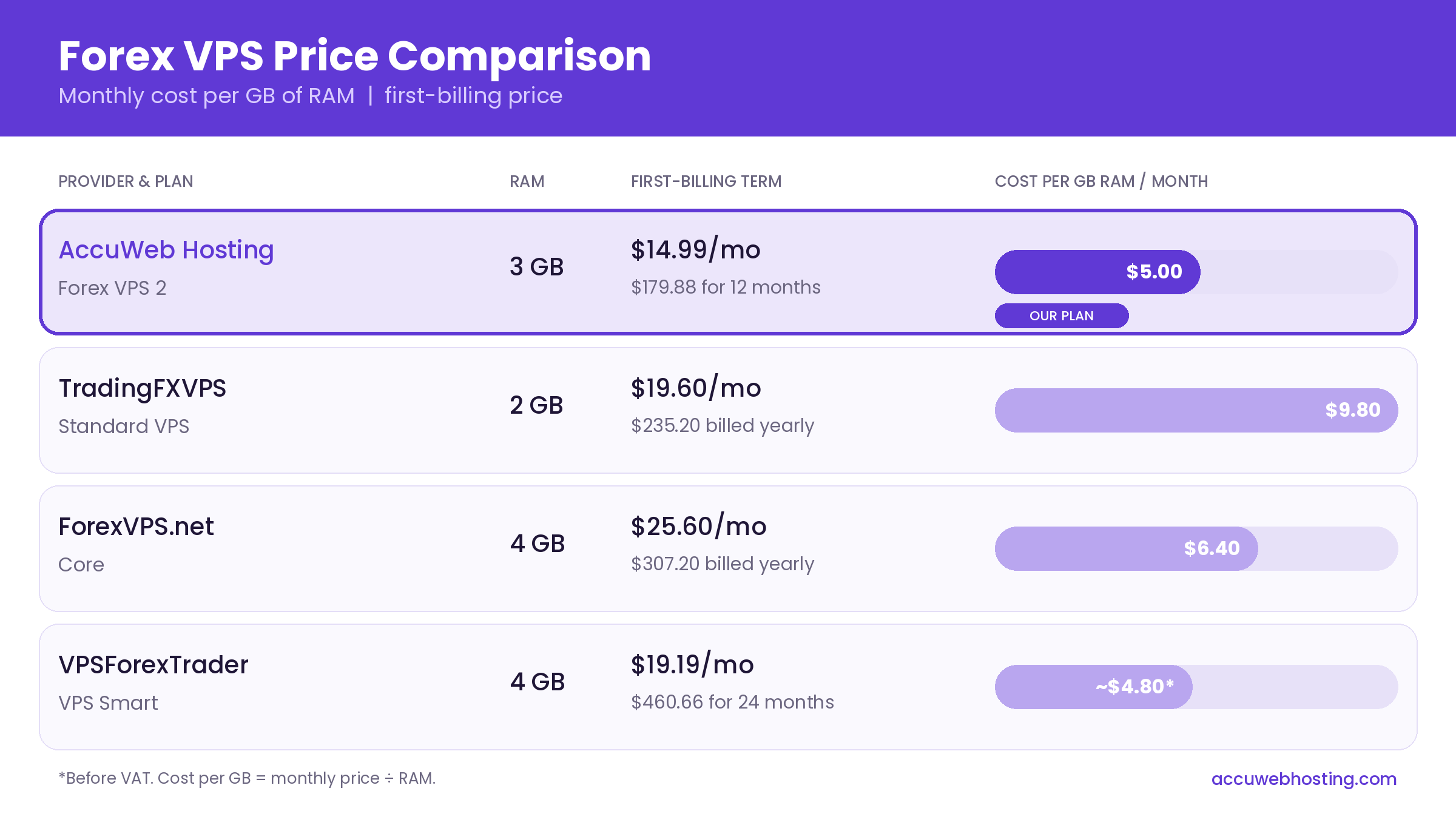
A lower monthly equivalent does not always mean a smaller first payment. Compare the full commitment: the billing term, the first payment, the RAM you receive, and the management that is included. Then match the plan to the number of terminals you run.
Latency is the time a signal takes to travel between systems. For a trading VPS, the useful comparison is the connection to your broker’s actual trade server.
The AccuWeb Hosting broker latency tool recommends a location after you select a broker. Support can test a broker that is not in the tool. The service lists 17 locations, including London, New York, and Denver.
A location near your home is not automatically nearest to your broker’s infrastructure. Test the trade-server endpoint you actually use, rather than selecting a city from a provider’s headline latency figure.
Read a Latency Result in Context
Imagine three test results of 10, 20, and 30 milliseconds. These are illustrative numbers, not broker measurements or a service promise. The 10-millisecond result is 20 milliseconds lower than the 30-millisecond result: 30 minus 10 equals 20.
That difference helps rank those test paths, but it does not predict order execution time. Your broker’s processing and market conditions are separate parts of the trade. Repeat tests when your setup or broker endpoint changes.
For a trader using multiple brokers, one location does not automatically give the lowest latency to every trade server. Compare each endpoint and prioritize the connection most important to the workload. The latency and performance discussion offers a starting point for ongoing observation.
Choose a Broker-Aware Location
Use the broker latency tool on the Forex VPS page to compare locations for your connection.
Understand RDP and Managed Monitoring
Full administrator access lets you manage the Windows server through Remote Desktop. RDP opens a remote Windows session, so you can work with the terminal as you would on a desktop.
The VPS hosting service includes Remote Desktop and administrator access. Forex VPS managed service also covers hardware monitoring, server and service monitoring, operating-system management, and 24/7 support.
Separate Server Health From Trading Health
Monitoring a server is not the same as checking whether an EA is trading as intended. A running Windows server can still have a disconnected terminal, an incorrect account, or an automated-trading setting turned off.
In MetaTrader 5, the platform-wide Allow Auto Trading setting controls whether EAs and scripts can trade. Disabling it prevents automated trading even when an individual EA permits trading.
Best-effort third-party tool installation is part of managed service. Keep your terminal configuration and EA behavior in your own review process. The support options explain the service assistance available.
Think Through Recovery Time
Suppose an illustrative interruption takes 1 minute to notice, 2 minutes to restart a terminal, and 3 minutes to check it. The total is 6 minutes: 1 + 2 + 3. This example is a planning exercise, not a measured support response or recovery promise.
The useful lesson is to account for all three stages. Server monitoring addresses infrastructure, while the terminal and EA still need their own checks after a restart.
Keep Control of Your Environment
See how managed Forex VPS hosting combines Windows access with server monitoring.
Switch Without Losing Track of Your Setup
A switch from broker-bundled hosting works best when you test the new environment before retiring the old one. Forex VPS supports both MetaTrader 4 and MetaTrader 5, so record which version each setup uses.
- Inventory your terminals. Record each terminal, broker server, EA, indicator, and required login.
- Select the location. Use the broker latency tool to compare the relevant trade-server connection.
- Prepare the Windows session. Connect through RDP and install the required trading software.
- Restore the configuration. Add the EA and its settings, then check the account and server shown in the terminal.
- Test trading permissions. Check platform-wide and individual EA settings before relying on automated trading.
- Observe the handover. Review terminal connectivity and journals before ending the previous hosting arrangement.
When running a parallel test, prevent the same live strategy from placing duplicate orders. A separate test account or a disabled trading setting can help you check the new installation without unintentionally duplicating activity.
After a Windows restart, check that the terminal has reopened, connected to the intended account, and retained the correct EA settings. A running application alone does not establish that automated trading is enabled.
Weekly backups are included for Forex VPS plans in London, Denver, and New York. Review your own recovery needs as well: a backup is not a substitute for checking the live terminal. The server backup service explains the available backup approach.
Prepare Your Trading Handover
Choose a Forex VPS plan that fits your terminal inventory and broker location.
Frequently Asked Questions
Is AccuWeb Hosting independent of broker-bundled hosting?
Yes. You can choose an AccuWeb Hosting Forex VPS independently and connect your supported trading terminal to your broker.
Which plan fits two MetaTrader terminals?
Forex VPS 1 is recommended for up to two terminals and includes 1.5 GB of RAM and one vCPU.
Which plan should I consider for four terminals?
Forex VPS 2 is recommended for up to four terminals. It includes 3 GB of RAM and two vCPU.
Can I use Remote Desktop to manage my trading software?
Yes. Forex VPS includes Remote Desktop and full administrator access to the Windows environment.
How do I test latency to a broker?
Select the broker in the latency tool for a location recommendation. Support can test a broker that is not in the tool.
Does managed monitoring check my EA’s trading decisions?
Managed monitoring covers infrastructure, servers, and services. You should still check your terminal connection, EA settings, and trading behavior.
Is AccuWeb Hosting less expensive than ForexVPS.net?
Compare the current AccuWeb Hosting plan price and billing cycle with ForexVPS.net Core’s $307.20 yearly first charge. Match the RAM and review the total commitment before deciding.
What should I check before leaving broker-bundled hosting?
Check your broker server, terminal version, EA settings, latency, and the handling of live orders during the handover.
Is there a free Forex VPS trial?
There is no free Forex VPS trial. Forex VPS plans include a seven-day money-back guarantee.
Make the Decision Around Your Trading Setup
The right BeeksFX alternative for Forex VPS is the one that fits your terminal count, broker connection, and operating routine. Start with the recommended plan capacity, test the broker route, and compare the full first-billing commitment.
Then verify your terminal and EA behavior during the handover. That gives you a clearer basis for choosing independent hosting than a generic latency claim or a monthly equivalent alone.
Choose Your Independent Forex VPS
Review the Forex VPS plans, location tool, and current billing options for your setup.

