
Find a Home for Client Builds
Explore WordPress plans with tools for building and maintaining client sites.
Key Takeaways
- Basic ++ is the entry plan and hosts one website; current pricing appears on the plan page.
- Startup ++ supports five websites and includes daily backups.
- One-click staging helps you test changes before they reach a live site.
- Agency Bronze offers five cPanel accounts for separate client access.
- Compare first-term charges alongside storage, account separation, and the length of the billing commitment.
Choose Capacity for Your Client Portfolio
AccuWeb Hosting offers four WordPress Hosting plans, from one site to unlimited websites. Each includes daily backups. The table highlights the capacity differences that matter when you host client builds.
| Plan | Website allowance | SSD storage | Bandwidth | RAM and CPU | Price and billing |
| Basic ++ | 1 website | 25 GB | 500 GB | 1 GB RAM, 1 vCPU | Add to cart >> |
| Startup ++ | 5 websites | 50 GB | 1 TB | 2 GB RAM, 1 vCPU | Add to cart >> |
| Professional ++ | Unlimited websites | 75 GB | 2 TB | 3 GB RAM, 2 vCPUs | Add to cart >> |
| Advanced ++ | Unlimited websites | 100 GB | 3 TB | 4 GB RAM, 2 vCPUs | Add to cart >> |
Choose Basic ++ when you need a home for one client site. Choose Startup ++ when you need to host up to five sites in one plan. Professional ++ and Advanced ++ suit larger portfolios that need more storage and resources. Both include a content delivery network, or CDN, for the main domain on request. A CDN stores copies of content closer to visitors. Basic ++ and Startup ++ include free SSL, which encrypts the connection between a visitor and the site. The plans also include email accounts, with allowances rising from 25 on Basic ++ to 1,000 on Advanced ++. Use the WordPress feature comparison to review the plan details before choosing. A website allowance tells you how many sites a plan can host, not how many separate client accounts it creates.
Match the Plan to Your Portfolio
Compare site allowances and resources before choosing where to host client builds.
Compare WordPress Basic ++ Pricing With Other Hosts
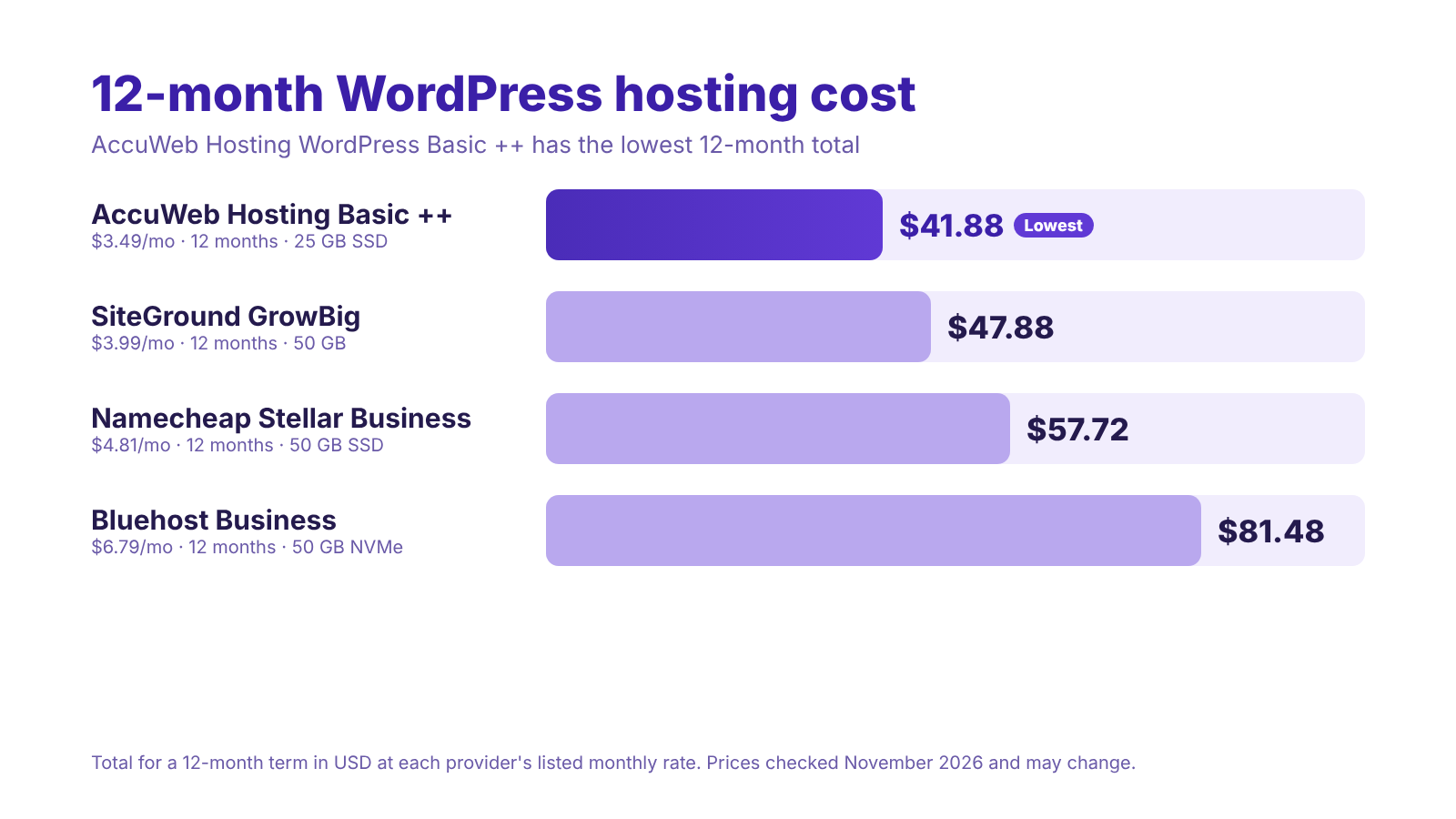
WordPress Basic ++ starts at $3.49 per month on a 12-month term. It includes 25 GB of SSD storage, 500 GB of bandwidth, 1 GB of RAM, 1 vCPU, 25 free email accounts, free SSL, free daily backup, a free domain registration, the cPanel control panel and 5 MySQL databases. The table below shows how that price compares with popular plans from other providers, with every plan priced on a 12-month term.
| Provider and plan | Storage | Monthly rate | Billing term | Total for the term |
|---|---|---|---|---|
| AccuWeb Hosting WordPress Basic ++ | 25 GB SSD | $3.49 | 12 months | $41.88 |
| SiteGround GrowBig | 50 GB | $3.99 | 12 months | $47.88 |
| Namecheap Stellar Business | 50 GB SSD | $4.81 | 12 months | $57.72 |
| Bluehost Business | 50 GB NVMe SSD | $6.79 | 12 months | $81.48 |
Prices in USD, all on a 12-month term. Taxes and optional extras are not included. Provider prices checked in November 2026 and may change.
Every plan above is priced for 12 months, so the totals are a like-for-like comparison. WordPress Basic ++ comes to $3.49 × 12 = $41.88 for the year. SiteGround’s GrowBig plan is $3.99 × 12 = $47.88, Namecheap’s Stellar Business plan is $4.81 × 12 = $57.72, and Bluehost’s Business plan is $6.79 × 12 = $81.48.
What You Save With WordPress Basic ++
-
- Against SiteGround GrowBig: $0.50 less every month, or $6.00 less over 12 months.
-
- Against Namecheap Stellar Business: $1.32 less every month, or $15.84 less over 12 months.
-
- Against Bluehost Business: $3.30 less every month, or $39.60 less over 12 months.
With a 12-month term, you pay a lower total than the other plans and get a complete WordPress setup from day one, cPanel, free SSL, free daily backup and a free domain registration included. For a closer look at features, visit our WordPress hosting overview.
If you are pricing a client project, write down the total for the term as well as the monthly rate. Comparing the same 12-month term keeps the numbers fair.
Start WordPress Hosting for $3.49 per Month
Choose WordPress Basic ++ on a 12-month term and launch your site with cPanel, free SSL and free daily backup.Use Staging Without Risking Live Content
WordPress staging hosting gives you a separate copy of a site for testing. AccuWeb Hosting WordPress Hosting includes one-click staging, so you can review changes away from the public site.
Separate Design Tests From Live Activity
Use staging for a theme change, layout revision, or plugin update. Review the result on a phone and desktop before asking the client to approve it. A staging copy also gives you a place to investigate an update that changes a page unexpectedly. The important distinction is between files and the database. The database holds changing content such as orders, comments, and form submissions. A full database push from staging can overwrite newer live content. For an active store, treat the period between copying the live site and publishing changes as a sensitive window. Decide which changes must move to production, then check live orders and submissions after the update.
Keep a Recovery Point
Daily backups give you a recovery point if a change needs to be reversed. Before a major release, identify the backup you would restore and understand which content arrived after it was created. Restoring an older database can also replace newer activity. For a brochure site with infrequent changes, that risk is different from a store receiving orders throughout the day. Your release process should reflect the client’s site, not just the size of the design change. For more on separating client work from live sites, read our guide to white-label hosting with staging. The goal is a repeatable workflow: test, review, publish, and check the live result.
Budget Storage Around Real Client Builds
Storage is shared across the sites on a plan, so count media libraries and site files together. Startup ++ has 50 GB for up to five websites. For this sizing example, assume each client site uses 5 GB. One site uses 5 GB, three use 15 GB, and five use 25 GB. At five sites, 5 × 5 GB = 25 GB, or half of the plan’s 50 GB storage.
That is a planning estimate, not a measurement of a client’s site. Image-heavy portfolios, downloadable files, and growing media libraries can change the calculation. Check actual usage before committing several clients to the same capacity. Site count and storage answer different questions. A five-site allowance does not mean each site receives a fixed 10 GB allocation. Likewise, an unlimited website allowance does not remove the plan’s storage, bandwidth, RAM, or CPU constraints. Caching helps reduce repeated work by storing versions of content for reuse. AccuWeb Hosting WordPress Hosting uses LiteSpeed and includes caching. After a design change, check the live page in a fresh browser session so you see the version visitors receive. When selecting a location, consider where the client’s audience lives. WordPress Hosting lists eight locations: Denver, Dallas, London, Frankfurt, Johannesburg, Mumbai, Singapore, and Sydney. Location is one part of the performance decision; page weight and caching also deserve attention.
Make Room for Client Content
Choose WordPress resources with your portfolio’s combined storage needs in mind.Give Clients Separate Hosting Accounts
Choose agency hosting when you need separate cPanel accounts for client access. AccuWeb Hosting’s agency plans combine account management with one-click staging and daily backups.
| Agency plan | cPanel accounts | Storage | Bandwidth | Price and billing |
| Bronze | 5 accounts | 30 GB | 100 GB | See agency page |
| Silver | 30 accounts | 100 GB | 300 GB | See agency page |
| Gold | 50 accounts | 150 GB | 600 GB | See agency page |
| Platinum | 100 accounts | 200 GB | 1 TB | See agency page |
Each agency cPanel account has 1 vCPU and 1 GB RAM. Agency hosting also includes WHM access and custom branding. WHM is the management interface for administering hosting accounts. Consider a freelancer managing five unrelated businesses. Startup ++ accommodates five websites, while agency Bronze offers five cPanel accounts. The distinction matters when each client needs access to a separate hosting account rather than only a WordPress login. The agency hosting plans also include free migration and free Let’s Encrypt SSL. The agency partner program has an $11.99 minimum monthly spend, which is a program requirement rather than a plan price. Before handoff, decide whether the client needs access to WordPress, hosting, or both. A WordPress editor account handles content changes; a hosting account reaches a different layer of the site.
Organize Client Access
Explore agency hosting when separate cPanel accounts fit your client workflow.Choose Cloud Resources for a Busy Site
For one resource-intensive client site, WordPress Cloud offers a different sizing path. Each plan hosts one website, with increasing storage, vCPU threads, and PHP workers. A PHP worker processes dynamic WordPress requests. The WP First, WP Second, WP Third, and WP Fourth plans include 2, 5, 12, and 30 PHP workers, respectively. More workers offer more capacity for concurrent dynamic requests, but they do not replace efficient site design.
WP First includes 25 GB NVMe storage and two vCPU threads. WP Second has 55 GB and five threads. WP Third has 75 GB and 12 threads, while WP Fourth has 150 GB and 30 threads. These plans include one-click staging, daily backups, global edge caching, SSH, and 24/7 priority support. SSH gives a developer command-line access. The plans also carry a seven-day money-back guarantee. Choose a cloud plan when one site needs a larger resource allocation. Choose a multi-site or agency plan when the more important requirement is hosting several client projects or separating accounts. Review the WordPress Cloud plan details alongside the client’s actual workload. An online store, for example, needs attention to dynamic requests and database changes as well as page design. For a move from an existing host, AccuWeb Hosting WordPress Hosting includes free migration. After the move, test forms, links, and client access before treating the handoff as complete.
Size a Demanding Client Site
Compare cloud resources when a single WordPress site needs more processing capacity.Frequently Asked Questions
Which WordPress plan fits a freelance designer with one client site?
Basic ++ hosts one website and includes 25 GB SSD storage and daily backups. It is the entry point for a single build.
Can I host several client sites on one WordPress plan?
Yes. Startup ++ supports five websites. Professional ++ and Advanced ++ support unlimited websites within their respective resource allowances.
Does a five-site plan give every client a separate cPanel account?
A website allowance is not the same as an account allowance. Agency Bronze includes five cPanel accounts if separate hosting access is important.
Why use staging for a client’s existing store?
Staging lets you test changes away from the live store. Take care with database pushes because live orders can arrive after the staging copy is made.
Are daily backups enough for every client release?
Daily backups supply a recovery point, but a restore can replace newer database activity. Check the recovery point and the site’s recent changes before a release.
Does AccuWeb Hosting cost less than SiteGround, Hostinger, or Bluehost?
Check the current AccuWeb Hosting price and billing term before comparing. The 50 GB competitor plans shown above have different first-billing terms and charges.
Should a freelancer choose WordPress Cloud or an agency plan?
Choose WordPress Cloud for one site that needs more processing resources. Choose agency hosting when separate client accounts are the priority.
What should I check before moving a client’s WordPress site?
Identify the site’s files and database, arrange access, and test forms and links after migration. AccuWeb Hosting WordPress Hosting includes free migration.
How does caching help after a design handoff?
Caching stores content for reuse, reducing repeated processing. Check that visitors see the updated page after publishing a design change.
Make the Hosting Decision Fit the Handoff
The best WordPress hosting for freelance web designers is the plan that fits both the build and the ongoing client relationship. Start with site count and storage, then decide whether separate accounts or more processing capacity matter most. Keep staging, recovery, and client access in the project scope. Those choices make the handoff clearer and give you a practical way to manage changes after launch.

