

Business email hosting for real estate agents puts your agency’s domain on every client message and keeps your whole team connected across devices. AccuWeb Hosting Business Email gives you branded mailboxes from just $2.99 per mailbox, with shared storage, shared calendars and mobile sync on every plan. AccuMail Start gives a small team 5 mailboxes and 50 GB of shared storage for $49.95 per month.
For an agent moving between showings, a recognizable address is only the beginning. Shared calendars, synchronized contacts and mobile access help the whole team respond quickly without relying on one desktop. This guide covers the four AccuMail plans with their prices, shows how the cost compares with Google Workspace, Microsoft 365 and Fastmail, and explains how to organize inboxes, calendars and storage for a real estate team.
Key takeaways
- Prices from $2.99 per mailbox. AccuMail Start is $9.99, Plus is $6.99, Pro is $3.99 and Enterprise is $2.99 per mailbox each month.
- Shared storage. Pool 50 GB to 1 TB across your team and give heavier users more room.
- Built for showings. Shared calendars, shared contacts and ActiveSync mobile sync keep appointments in step.
- Lower cost for larger teams. A 50-mailbox brokerage pays $199.50 per month on AccuMail Pro, below the other providers compared here.
- Protected and easy to move. Premium anti-spam, encryption, two-factor authentication and assisted migration.
Give Your Agency a Branded Inbox
Start with 5 mailboxes and 50 GB of shared storage for $49.95 per month.Choose Business Email Hosting for Real Estate Agents
Choose a mailbox tier based on the number of people who need their own sign-in and the storage your team expects to use. AccuWeb Hosting offers four named tiers, and the price per mailbox drops as your team grows.
| Plan | Mailboxes | Shared storage | Price per mailbox | Total per month |
|---|---|---|---|---|
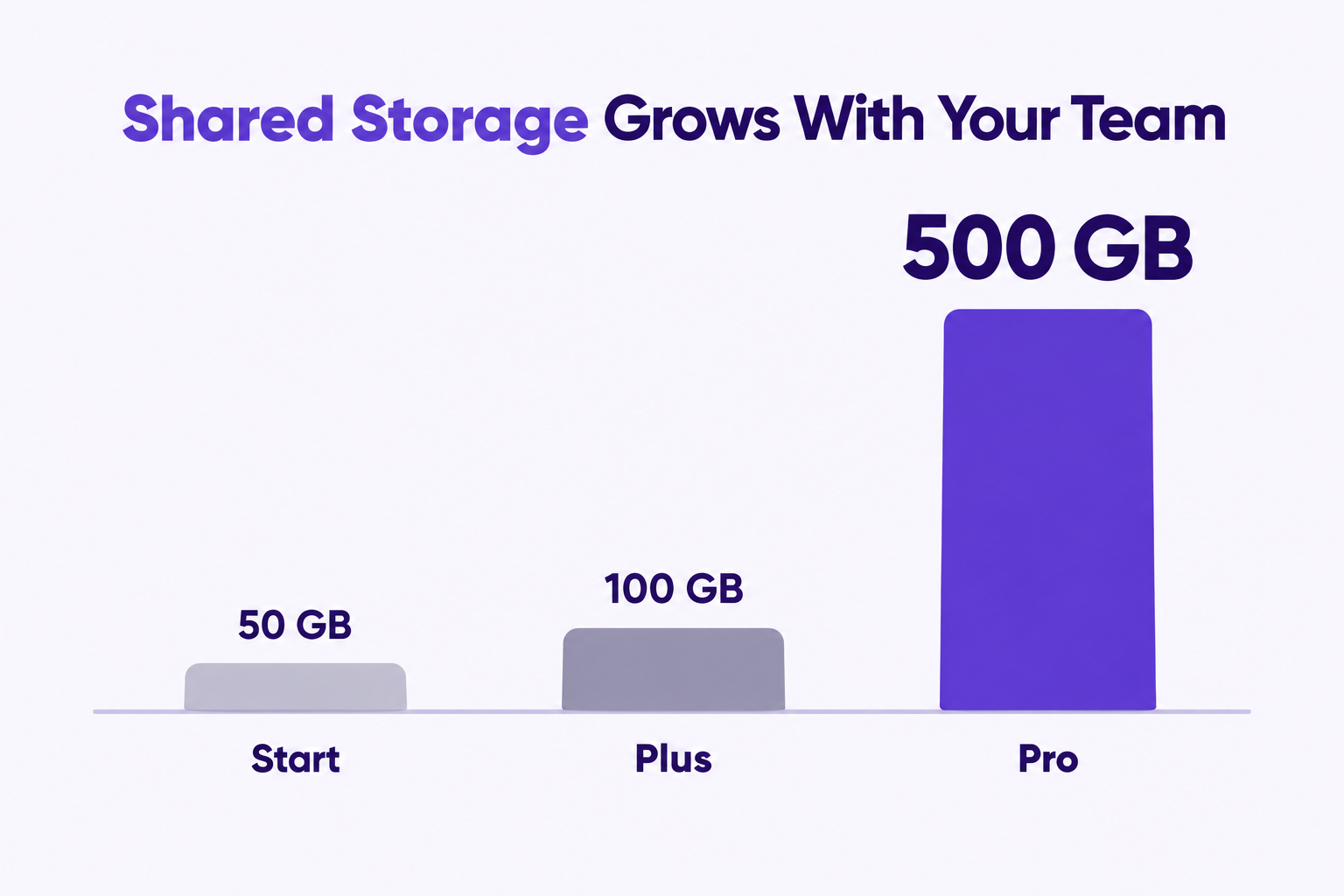
| AccuMail Start | 5 | 50 GB | $9.99 | $49.95 |
| AccuMail Plus (Most Popular) | 10 | 100 GB | $6.99 | $69.90 |
| AccuMail Pro | 50 | 500 GB | $3.99 | $199.50 |
| AccuMail Enterprise | 50 to 100 | 1 TB | $2.99 | $299.00 at 100 mailboxes |
Prices in USD per mailbox per month. All plans include premium anti-spam, advanced security, web and mobile access and 24/7 email support.
Start, Plus and Pro each work out to an average of 10 GB of storage per included mailbox. For Start, that is 50 GB divided by 5 mailboxes. Because the storage is pooled, you can give more room to the people who need it.
Match Capacity to Your Team
Choose Start for up to five separate mailboxes. Choose Plus for up to ten, or Pro for up to 50. Enterprise covers 50 to 100 mailboxes, and it brings the price down to $2.99 per mailbox.
As a planning example, two agents and one coordinator use three of Start’s five mailboxes. That leaves two included mailboxes for new staff. If your agency needs more than 100 mailboxes, you can contact our team about a custom enterprise solution with ample storage and advanced security.
Find Your Mailbox Tier
Plus is our most popular plan, with 10 mailboxes and 100 GB of shared storage for $69.90 per month.Business Email Price Comparison: AccuWeb vs Google, Microsoft and Fastmail
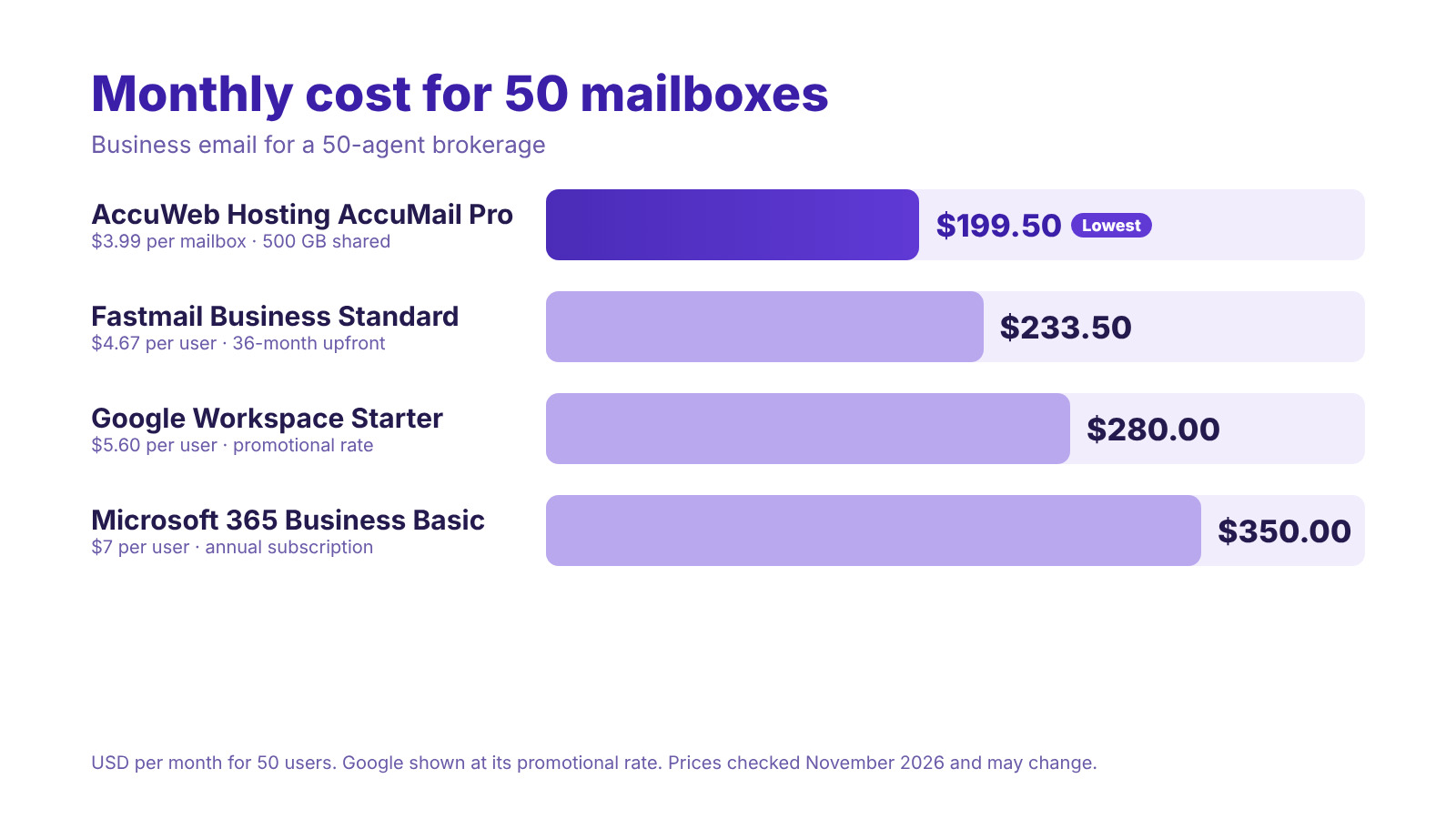
Mailbox count, billing and storage all affect what a team pays. The clearest way to compare is by the number of users. A brokerage with 50 agents and staff is a good example, because every provider below charges per user while AccuMail Pro includes all 50 mailboxes.
| Provider and plan | Price per user | Cost for 50 users per month | Storage |
|---|---|---|---|
| AccuWeb Hosting AccuMail Pro | $3.99 | $199.50 | 500 GB shared |
| Fastmail Business Standard | $4.67 (36 months paid upfront) | $233.50 | 50 GB mail plus 10 GB files per user |
| Google Workspace Business Starter | $5.60 (first three months) | $280.00 | 30 GB pooled per user |
| Microsoft 365 Business Basic | $7.00 (annual subscription) | $350.00 | 1 TB cloud storage per user |
Prices in USD, calculated as price per user × 50. Competitor prices checked in November 2026 and may change. Taxes are not included. Cloud file storage and shared mailbox storage are different resources.
AccuMail Pro costs $199.50 per month for all 50 mailboxes. That is $34.00 less than Fastmail, $80.50 less than Google Workspace and $150.50 less than Microsoft 365 every month. Over a year, the difference is $408 against Fastmail, $966 against Google Workspace and $1,806 against Microsoft 365.
What a 100-Mailbox Agency Pays
At 100 mailboxes, AccuMail Enterprise costs $299.00 per month at $2.99 per mailbox. The same 100 users cost $467.00 per month on Fastmail, $560.00 on Google Workspace and $700.00 on Microsoft 365, based on the prices above.
-
- AccuMail Enterprise: $299.00 per month for 100 mailboxes and 1 TB of shared storage.
-
- Savings: $168 to $401 less every month than the other providers compared here.
-
- Smaller teams: AccuMail Plus is $6.99 per mailbox, with 10 mailboxes and 100 GB of shared storage for $69.90 per month.
The price also includes tools that suit a busy agency: shared calendars, mobile sync, Outlook support, a web-based admin panel and 24/7 email support. That leaves more of your budget for marketing, listings and client service.
See What Your Agency Could Save
AccuMail Pro covers 50 mailboxes for $199.50 per month, with 500 GB of shared storage.Build an Inbox Structure for Property Leads
A real estate agency email setup works best when clients know where to write and staff know who can respond. AccuMail lets you create users, manage aliases, set up mailing lists and department groups, and delegate mailbox access to the people who need it.
An alias is another address that directs mail to an existing mailbox. A mailing list or group sends a message to several people at once. Delegated access lets authorized team members work with a common inbox.
Separate Individual and Team Addresses
Give each agent a personal address on the agency domain, such as [email protected]. Use a recognizable team address, such as [email protected], for inquiries that should reach a group.
-
- Personal address: one per agent for direct client conversations.
-
- Alias: an extra address, such as [email protected], that delivers to one mailbox.
-
- Group address: a list such as [email protected] that reaches the whole team.
-
- Delegated access: a coordinator who can help manage an agent’s inbox during a busy week.
Decide who answers each lead and how the team records that response, especially when more than one person can see the message. A simple rule such as “the first person to reply marks the message” avoids duplicate replies.
Allocate Storage Where You Need It
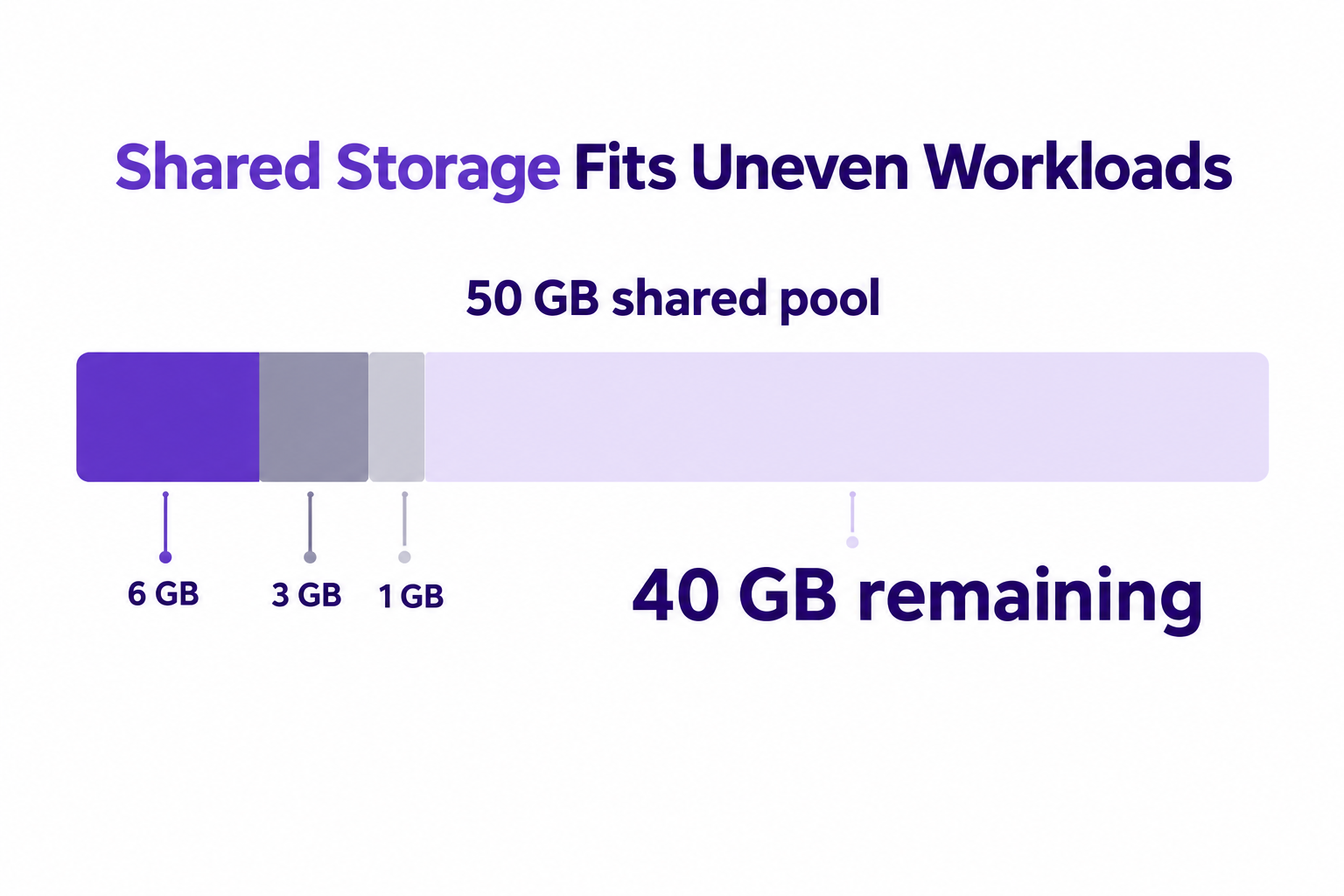
Shared storage makes room for different workloads. One listing agent may keep more image-heavy correspondence than a coordinator, so you can allocate more space to power users without upgrading every mailbox. You can adjust the allocation as your needs change.
For a sizing estimate, assume three users store 6 GB, 3 GB and 1 GB. Together they use 10 GB. On Start’s 50 GB pool, that leaves 40 GB for new listings, transaction correspondence and new staff.
Review the size of your existing mail and attachments before you move. Leave room for growth instead of choosing only by the current number of agents.
Keep Showings and Contacts in Sync
Email hosting with calendar access helps agents coordinate work without keeping separate appointment lists on every device. AccuMail includes shared calendars, shared contacts, tasks, notes and built-in video meetings in one web workspace.
Use a shared calendar for showings that involve more than one team member. Add the property address and appointment details, then share access with the people responsible for the visit.
Use Mobile Access Between Appointments
ActiveSync synchronizes push email, calendar updates and contacts on iOS and Android. Push email delivers new messages to the phone as they arrive, so an agent does not have to check manually after each showing.
After adding an account, test an email, a contact and a calendar event on the phone and in the web interface. That way the agent sees the same appointment information before leaving for a showing.
Work in the Email App You Prefer
AccuMail supports Outlook through MAPI, EWS and IMAP, along with ActiveSync for phones. It also works with Apple Mail, Thunderbird and other standard email clients, so each agent can use the app they already know. Outlook users get synchronized email, calendars and contacts.
Coordinate Coverage During a Showing
A shared lead address and a shared calendar solve different problems. The inbox keeps inquiries visible to authorized staff, and the calendar shows when an agent is busy. For example, a coordinator can watch a team inbox while two agents attend appointments, acknowledge a new inquiry and find an available agent without waiting for a desktop session.
Stay Connected at Every Showing
Shared calendars, contacts and mobile sync come with every AccuMail plan, from $2.99 per mailbox.Protect and Move Agency Correspondence
Client emails often contain contracts, financial details and personal information, so protection matters. AccuMail includes premium anti-spam filtering, encrypted transmission (TLS), encrypted storage (AES-256) and two-factor authentication on top of advanced account security.
-
- Anti-spam: inbound and outbound filtering helps block phishing and malware before they reach the inbox.
-
- Two-factor authentication: adds a second sign-in check beyond the password.
-
- Admin control: create users, assign roles and reset passwords from a web-based admin panel.
-
- Archiving and audit logs: keep a searchable history and a record of administrative actions.
Use an individual sign-in for every agent and review access when someone joins or leaves the team. For any unexpected request for payment or a change to transaction instructions, confirm with the client through a channel you already trust.
Move Mail Before Changing Daily Workflows
AccuWeb Hosting offers assisted migration from Google Workspace and Microsoft 365, and our free migration services are available for your website too. A short checklist keeps the move smooth.
-
- Inventory accounts. Count the mailboxes, aliases and groups your agency uses.
- Prepare the move. List the folders, contacts and calendars staff need in the new environment.
- Test the result. Send and receive messages, then check calendar events and contacts on each agent’s device.
Keep the old service available until you have checked important correspondence and current appointments. If you need a hand at any stage, our team is available through our support options, and AccuMail comes with 24/7 email support.
Prepare Your Agency for the Move
Choose your AccuMail tier and ask about assisted migration from Google Workspace or Microsoft 365.Conclusion
Business email hosting for real estate agents works best when it combines a professional address, shared calendars and reliable mobile access at a price your team can plan around. AccuMail starts at $2.99 per mailbox and scales from 5 to 100 mailboxes.
-
- Pricing: $9.99, $6.99, $3.99 and $2.99 per mailbox each month across Start, Plus, Pro and Enterprise.
-
- Savings: 50 mailboxes cost $199.50 per month, compared with $233.50 to $350 elsewhere.
-
- Collaboration: shared calendars, shared contacts, tasks and video meetings.
-
- Mobile and Outlook: ActiveSync, MAPI, EWS and IMAP support.
-
- Protection: anti-spam, encryption and two-factor authentication.
Start with the number of people who need their own sign-in, then add shared addresses and appointment coverage. Choose a tier that gives your team room to respond today and grow tomorrow.
Bring Your Agency Email Together
Choose your AccuMail plan and give every agent a branded inbox today.Frequently Asked Questions
How much does business email hosting for real estate agents cost?
AccuMail starts at $9.99 per mailbox for Start (5 mailboxes, $49.95 per month), $6.99 for Plus (10 mailboxes, $69.90), $3.99 for Pro (50 mailboxes, $199.50) and $2.99 for Enterprise (50 to 100 mailboxes, $299 at 100).
Can a solo agent use an address on a custom domain?
Yes. AccuWeb Hosting Business Email supports custom-domain addresses such as [email protected]. Start includes five mailboxes, so a solo agent has room to add an assistant or a team address.
How many mailboxes does a small brokerage need?
Count the people who need individual sign-ins, then add any team addresses you want. Two agents and one coordinator need at least three mailboxes, which fits comfortably inside Start.
Can agents share a calendar for showings?
Yes. AccuMail supports shared calendars and shared contacts, so authorized team members can coordinate appointments and see the details they need.
Does business email sync with a phone?
Yes. ActiveSync supports push email, calendar updates and contact synchronization on iOS and Android.
Does AccuWeb Hosting cost less than Google Workspace?
For larger teams, yes. At 50 users, AccuMail Pro costs $199.50 per month, compared with $280 for Google Workspace Business Starter at its promotional rate and $350 for Microsoft 365 Business Basic. At 100 mailboxes, Enterprise costs $299 per month.
Does AccuMail work with Microsoft Outlook?
Yes. AccuMail supports Outlook through MAPI, EWS and IMAP, and it also works with Apple Mail, Thunderbird and other standard email clients.
Can I move my existing mail and calendars?
Yes. AccuWeb Hosting offers assisted migration from Google Workspace and Microsoft 365. Check your messages, contacts and calendar events after the move before you retire the old service.
How is shared storage different from a mailbox quota?
A shared storage pool serves all mailboxes on the plan. Start’s 50 GB across five mailboxes averages 10 GB each, and you can give more space to the users who need it.
Can I upgrade my plan later?
Yes. You can move from Start to Plus, Pro or Enterprise as your team grows, and the price per mailbox drops with each step.

