
Managing a Linux server from the command line is a skill many site owners enjoy learning, but it is not always the quickest way to finish routine work. A web-based panel puts the most common tasks in a single browser tab, and the Ajenti control panel on a VPS Hosting is one of the most approachable ways to get there. You get a live dashboard, a terminal, a file manager and editors without paying for a commercial panel license.
This guide explains what Ajenti is, how its open-source web control panel, text editor, code manager, terminal access and file manager work together, and how to run it on an AccuWeb Hosting’s VPS Hosting. You will also find a plan-by-plan price breakdown and a comparison of 4 GB and 8 GB VPS costs across well-known providers, so you can choose a setup that fits your budget from day one.
Key takeaways
- Free and open source. Ajenti is a Python-based server admin panel released under the MIT license, so there is no panel license fee.
- Five tools in one browser tab. The open-source panel, terminal access, file manager, text editor and code manager cover everyday server work.
- Low entry price. AccuWeb Hosting VPS Hosting plans start at $4.95/mo on a 24-month term with 4 GB RAM, 1 vCPU and 50 GB storage.
- Clear cost savings. Over 24 months, a 4 GB AccuWeb Hosting plan totals $118.80, compared with $576 at $24/mo, and an 8 GB plan totals $166.80, compared with $1,152 at $48/mo.
- Support from day one. Our team installs free control panels such as Ajenti, migrates your site for free and is available 24/7.
What Is the Ajenti Control Panel?
Ajenti is a modular, web-based server management panel for Linux and BSD systems. It is written in Python and distributed under the MIT license, which means it is open source and free to use, modify and extend. The project’s public repository dates back to 2010 and has collected more than 7,500 stars on GitHub, a sign of steady interest from system administrators and developers.
Ajenti 2, the current generation, runs as a web application on the server itself. After the service starts, you open a browser, enter the server’s IP address followed by port 8000, sign in and see a dashboard with live details about the machine. The interface is built to work on desktops, tablets and phones, so you can check on your VPS when you are away from your desk.
Several design choices make it a comfortable match for a virtual private server:
- Works with your existing setup. Ajenti picks up the configuration already on the system and does not overwrite your config files, options or comments.
- Light on resources. A small memory and CPU footprint leaves more of your allocated RAM for websites and applications.
- Plugin-based. Stock plugins cover system and software configuration, monitoring and management, and developers can write their own plugins in Python.
- Familiar tools. A terminal, a file manager and editors sit in the same interface, so most small jobs never need a second tool.
Why Run the Ajenti Control Panel on a VPS Hosting?
A VPS gives you an isolated environment with root access and guaranteed resources, which is exactly what a server-level panel like Ajenti is designed to manage. If you are new to the concept, our guide on what is VPS hosting covers the basics in plain language.
Demand for this kind of hosting keeps rising. IMARC Group reports that the global virtual private server market was valued at USD 5.1 billion in 2024 and is projected to reach USD 14.1 billion by 2033, a compound annual growth rate of 11.9%. Growth at that pace reflects how many businesses want the control and predictable performance a VPS provides.
An AccuWeb Hosting VPS Hosting adds the following foundation for Ajenti:
- Dedicated resources. Every plan includes guaranteed RAM, vCPU and storage, and we never oversell server resources.
- Root access. Full SSH control lets you install any software and shape the server to your needs.
- NVMe storage and modern processors. Plans run on the latest Intel Scalable and AMD EPYC CPUs with high-speed NVMe storage.
- Isolated environments. Each VPS is fully separated from the others, which supports stability and security.
- Easy upgrades. Move to a higher plan anytime with minimal downtime, and your data, IP address and configuration stay intact.
Key Features of the Ajenti Control Panel
Ajenti keeps the daily tasks of server administration within reach. The five tools below are the ones most VPS owners use every week, and together they replace a lot of switching between windows.
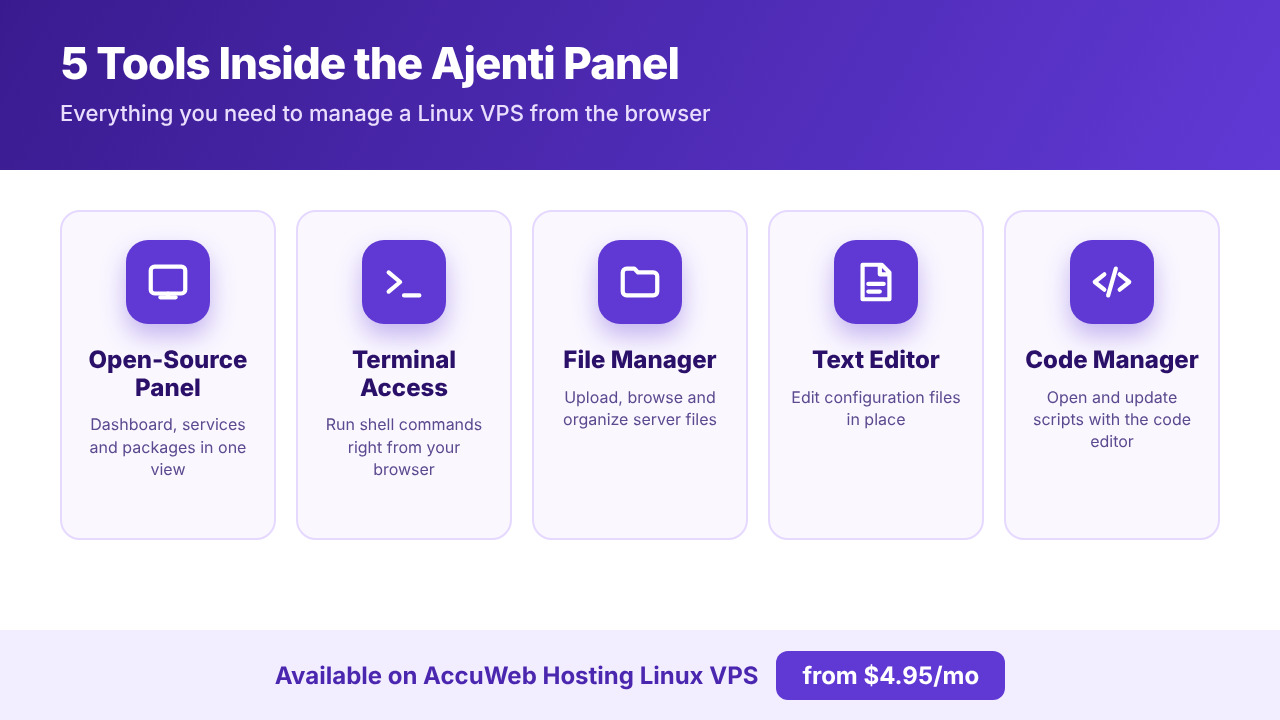
Open-Source Web Control Panel
The dashboard is the starting point. It shows real-time CPU, RAM, disk and network usage so you can judge how the server is behaving at a glance. From the same interface you can start and stop services and manage packages. Because the code is open source under the MIT license, there is no license fee for the panel, and the plugin design lets you enable only the modules you need.
On an AccuWeb Hosting VPS, this gives you a clean management layer on top of a server that already includes root access, dedicated resources and a web-based VPS management panel for monitoring CPU, RAM and disk usage.
Terminal Access From the Browser
The built-in terminal lets you run shell commands without opening a separate SSH client. Updating packages, reading logs, restarting a service or checking free disk space takes a few keystrokes. If you prefer a traditional client, full SSH control remains available on every AccuWeb Hosting VPS, so you can use whichever fits the task.
- Check disk space and memory usage
- Install or update software packages
- Restart services after a configuration change
- Run maintenance scripts on demand
File Manager
The file manager lets you browse, upload, download and edit files on the server from your browser. It is a quick way to place website files, review directory contents and download copies of important documents. Because it lives in the same panel as the terminal, you can move between visual and command-line work without losing your place.
Text Editor
Ajenti includes a Notepad plugin for editing plain-text files directly on the server. Open a configuration file, adjust a setting, save it and move on. For routine edits, this removes the need to download a file, change it locally and upload it again.
Code Manager
Developers can use Ajenti’s code editing tools to open, review and update scripts and application files in place. Paired with the terminal and file manager, this forms a lightweight workspace that suits quick fixes on a staging site, small automation scripts and configuration updates, all from a browser tab.
Ajenti Control Panel on AccuWeb Hosting VPS Hosting
Our VPS Hositng plans are designed for people who want control over their server. We can install free control panels such as ISPConfig, Ajenti, Webmin, CWP, CyberPanel, aaPanel and FastPanel for simplified management, so you can choose the interface that suits your workflow. For many customers, a free control panel for VPS management is the most practical way to keep costs down while keeping everyday tasks simple.
Behind every plan is more than 23 years of experience in the hosting business, over 1 million websites deployed and managed, and more than 100,000 VPS deployed and managed. Our ticket first response time is under 11 minutes, and customers have rated us 4.5 out of 5 across 223 Trustpilot reviews.
VPS Hosting Plans and Pricing
Choose the plan that matches the resources your site or application needs. Each one includes dedicated RAM and vCPU, NVMe storage, root access and a dedicated IP address. You can also review every option on our VPS hosting plans page.
| Plan | Best for | RAM | vCPU | Storage | Bandwidth | Price (24-month term) |
|---|---|---|---|---|---|---|
| VPS Edge | Small websites and dev projects | 4 GB | 1 | 50 GB | 250 GB | $4.95/mo |
| VPS Peak | Growing sites and ecommerce | 8 GB | 2 | 100 GB | 450 GB | $6.95/mo |
| VPS Power | High-traffic sites and agencies | 16 GB | 3 | 200 GB | 650 GB | $9.95/mo |
| VPS Supreme | Heavy apps and multiple sites | 32 GB | 4 | 400 GB | 1000 GB | $19.95/mo |
Every plan includes 1 IP address. Prices are shown for the 24-month term. Last updated: November 2026.
VPS Edge is a natural starting point for a personal site, a development server or an Ajenti learning environment. VPS Peak, our most popular plan, gives growing websites and online stores 8 GB of RAM and 2 vCPUs. VPS Power and VPS Supreme add more memory, cores and storage for high-traffic sites, agencies and heavy applications.
What Is Included With Every VPS Hosting
- Guaranteed resources. Dedicated RAM, vCPU and storage with no overselling.
- Reliable platform. Redundant drives, processors and storage keep your VPS online during hardware failures, backed by a 99.9% uptime guarantee.
- Security. 24/7 monitoring with active DDoS protection, an isolated VPS environment and a dedicated IP address.
- Backups. Free backups come with all plans, and you can enable daily backups at an affordable price through our VPS backup services.
- Unlimited domains. Host as many websites as you like on any VPS plan.
- Virtualization. KVM with SolusVM for flexible control, and Xen with PV drivers for stable, high-performance operation.
- No setup fees. Launch your VPS without any setup charge.
- Risk-free start. A 7-day money-back guarantee lets you try the service with confidence.
Prefer a commercial panel for certain projects? cPanel, Plesk, Webuzo, ispmanager and DirectAdmin are available as add-ons, and you can learn more about our cPanel VPS hosting option. Ajenti remains a free choice for administrators who value a lightweight interface.
Launch Your VPS Hosting Today
Pick a plan, choose your data center and let our team set up Ajenti for you. Your 7-day money-back guarantee starts the day you order.
Choose a Data Center Close to Your Audience
Server location shapes how quickly pages reach your visitors. You can deploy your VPS Hosting in 16+ data center locations across three regions. See the full list on our global data center locations page.
- North America: Denver, New York, N. Virginia, Ohio, Oregon and Montreal.
- Europe and Africa: London, Johannesburg, Frankfurt, Dublin, Paris and Stockholm.
- Asia Pacific: Hyderabad, Singapore, Sydney, Tokyo and Seoul.
Latency depends on visitor location, ISP routing and network conditions, so selecting a region near most of your users is a simple way to improve the experience. Network ports range from 1 Gbps to 25 Gbps, and a load balancer option is available with most server locations to distribute traffic during busy periods.
VPS Hosting Pricing Comparison: AccuWeb Hosting vs Other Providers
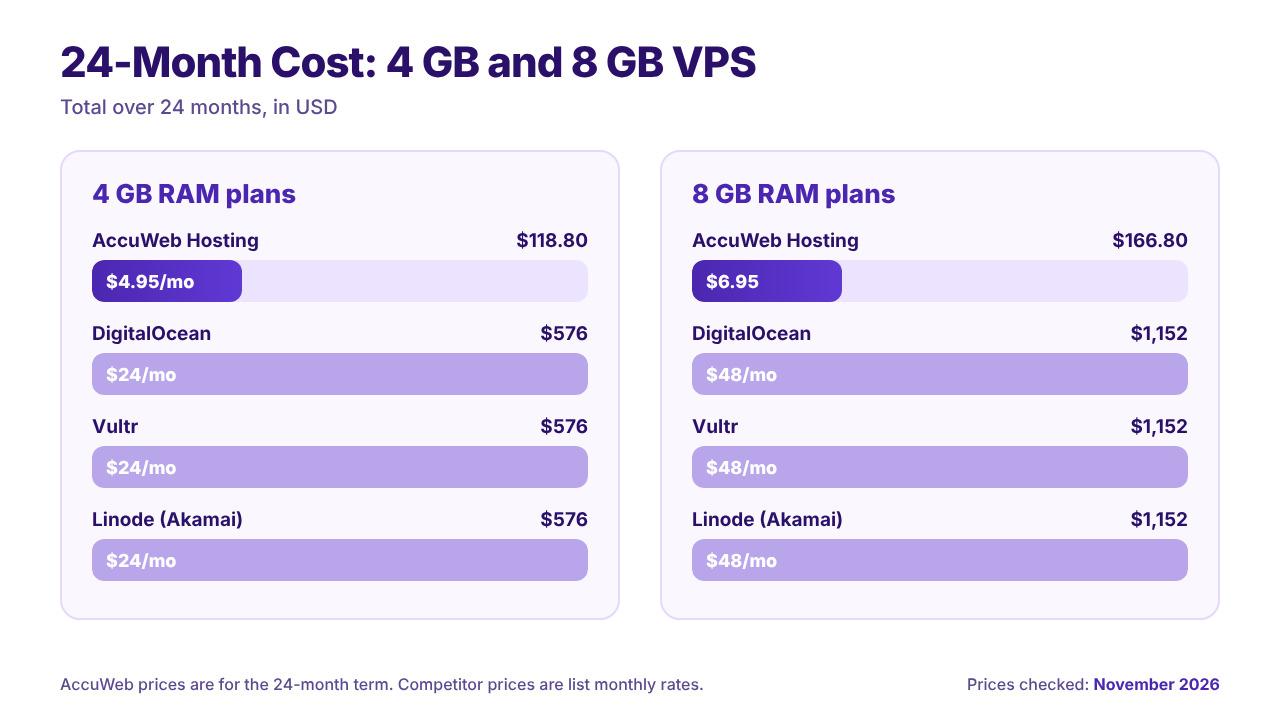
The panel itself costs nothing, so the price of the server becomes the main part of your budget. The table below compares AccuWeb Hosting VPS Hosting plans with the standard monthly list prices of three widely used cloud server providers, for both 4 GB and 8 GB RAM tiers. To keep the comparison fair, it shows the number of vCPUs on each plan and the total over a 24-month period.
| Provider | 4 GB plan per month | 4 GB total over 24 months | 8 GB plan per month | 8 GB total over 24 months |
|---|---|---|---|---|
| AccuWeb Hosting VPS Hosting | $4.95 (1 vCPU) | $118.80 | $6.95 (2 vCPU) | $166.80 |
| DigitalOcean Basic Droplet | $24 (2 vCPU) | $576 | $48 (4 vCPU) | $1,152 |
| Vultr Cloud Compute (High Performance) | $24 (2 vCPU) | $576 | $48 (4 vCPU) | $1,152 |
| Linode (Akamai) Shared CPU | $24 (2 vCPU) | $576 | $48 (4 vCPU) | $1,152 |
AccuWeb Hosting prices apply to the 24-month term. Competitor figures are published standard monthly list prices; plan specifications vary by provider. Last updated: November 2026.
Here is what the numbers show:
- 4 GB tier: $4.95 per month compared with $24 is about 79% lower, which saves $457.20 across 24 months.
- 8 GB tier: $6.95 per month compared with $48 is about 86% lower, which saves $985.20 across 24 months.
- Included extras: free website migration, free backups, a dedicated IP address, DDoS protection and 24/7 expert support come with every AccuWeb Hosting plan.
These savings add up quickly if you run several servers, a staging environment or separate projects for clients. A lower monthly cost leaves room in the budget for a larger plan, extra daily backups or a second server in another region.
See What Your VPS Could Cost
Compare all four VPS Hosting plans side by side and find the one that matches your traffic, your projects and your budget.
How to Set Up the Ajenti Control Panel on Your VPS Hosting
Getting started takes only a few steps, and our team is available to help with each one.
- Choose your plan. Match your project to VPS Edge, Peak, Power or Supreme.
- Select a location. Pick the data center closest to your audience from our 16+ locations.
- Place your order. There are no setup fees, and your VPS is delivered once the order verification is complete.
- Request Ajenti. Contact our support team and ask us to install Ajenti as your free control panel.
- Open the panel. Enter your server’s IP address followed by port 8000 in your browser and sign in with your server credentials.
- Personalize it. Set a strong admin password, enable only the plugins you need and add a backup routine.
Already have a website elsewhere? Our experts handle the move for you through our free VPS migration service, so your site arrives on the new server ready to run.
If you ever need a hand, our 24/7 support options include access to documentation, step-by-step tutorials and optional managed services alongside round-the-clock assistance from our support team.
Who Benefits Most From the Ajenti Control Panel on a VPS Hosting?
Developers and Small Projects
A development server needs a quick way to edit files, run commands and watch resource usage. The terminal, code tools and dashboard in Ajenti cover those needs, and VPS Edge keeps the monthly cost low while you build.
Growing Websites and Online Stores
As traffic increases, the ability to check CPU and RAM usage at a glance helps you decide when to scale. VPS Peak offers 8 GB of RAM and 2 vCPUs for growing sites and ecommerce, and you can upgrade to a higher plan whenever you are ready.
Agencies and Multi-Site Owners
Because every plan supports unlimited domains, one VPS can host many client sites. VPS Power and VPS Supreme provide the memory, vCPUs and storage that agencies and heavy applications need, while the file manager and editors keep routine changes fast.
People Learning Linux
Ajenti is a friendly place to learn server administration. You can explore services, packages and the terminal in a real Linux environment, and the 7-day money-back guarantee lets you experiment with confidence.
Practical Tips for Managing Your VPS With Ajenti
- Check the dashboard regularly. Watching CPU, RAM, disk and network usage helps you spot trends early.
- Keep packages current. Use the package tools or the terminal to apply updates on a schedule.
- Use your backups. Free backups are included, and daily backups are available as an option for sites that change often.
- Enable only what you need. A focused set of plugins keeps the interface tidy and the server light.
- Plan for growth. Upgrade to a larger plan as traffic rises, keeping your data, IP and configuration in place.
- Use a load balancer for busy periods. The load balancer option helps spread traffic and reduce slowdowns at peak times.
Conclusion
The Ajenti control panel on a VPS Hosting gives you a free, open-source way to manage your server from any browser. The open-source panel, terminal access, file manager, text editor and code manager handle the everyday jobs, and AccuWeb Hosting supplies the foundation: dedicated resources, root access, NVMe storage, 16+ locations, a 99.9% uptime guarantee and a 7-day money-back guarantee.
Here is a quick recap of what you get:
- A free, MIT-licensed control panel with five practical tools in one interface
- VPS Hosting plans from $4.95/mo on a 24-month term
- 24-month totals of $118.80 for 4 GB and $166.80 for 8 GB, compared with $576 and $1,152 at the list prices shown above
- Free migration, free backups, DDoS protection and 24/7 support included
Pick your plan, choose a location and ask our team to set up Ajenti. You can have a clean, browser-based control panel running on your own VPS in a short time.
Start Your VPS Hosting With Ajenti
Get dedicated resources, root access and a free control panel from $4.95/mo. Order today and enjoy a 7-day money-back guarantee.
Have Questions Before You Order?
Our team can help you choose a plan, pick a data center and plan your migration. Reach out and we will respond quickly.
Frequently Asked Questions
What is the Ajenti control panel?
Ajenti is an open-source, web-based server administration panel for Linux and BSD systems. It is written in Python and offers a dashboard, terminal, file manager and editors that you open in a browser.
Is Ajenti free to use?
Yes. Ajenti is released under the MIT license, so the software itself is free. AccuWeb Hosting lists Ajenti among the free control panels we can install on a VPS Hosting.
Can I run the Ajenti control panel on an AccuWeb Hosting VPS Hosting?
Yes. Every VPS Hosting includes full root access, and our team can install free control panels such as Ajenti for you. Contact support after ordering and we will take care of it.
Which tools does Ajenti include?
The panel includes a live dashboard, a browser-based terminal, a file manager, a text editor and code editing tools, plus plugins for service and package management.
How much does a VPS Hosting cost at AccuWeb Hosting?
Plans start at $4.95/mo for VPS Edge on a 24-month term, with 4 GB RAM, 1 vCPU, 50 GB storage and 250 GB bandwidth. VPS Peak is $6.95/mo, VPS Power is $9.95/mo and VPS Supreme is $19.95/mo on the same term.
Can I host more than one website on my VPS?
Yes. You can host unlimited domains under any VPS hosting plan.
Is there a money-back guarantee?
Yes. Every VPS order is covered by a 7-day money-back guarantee.
Can I upgrade my plan later?
Yes. You can upgrade to a higher plan at any time with minimal downtime, and your data, IP address and configuration stay intact.
Do you migrate existing websites for free?
Yes. Our site migration team moves your website to your new VPS at no charge.

