Stop the 504: Ultimate Guide to Cloud Hosting for WordPress & Failover
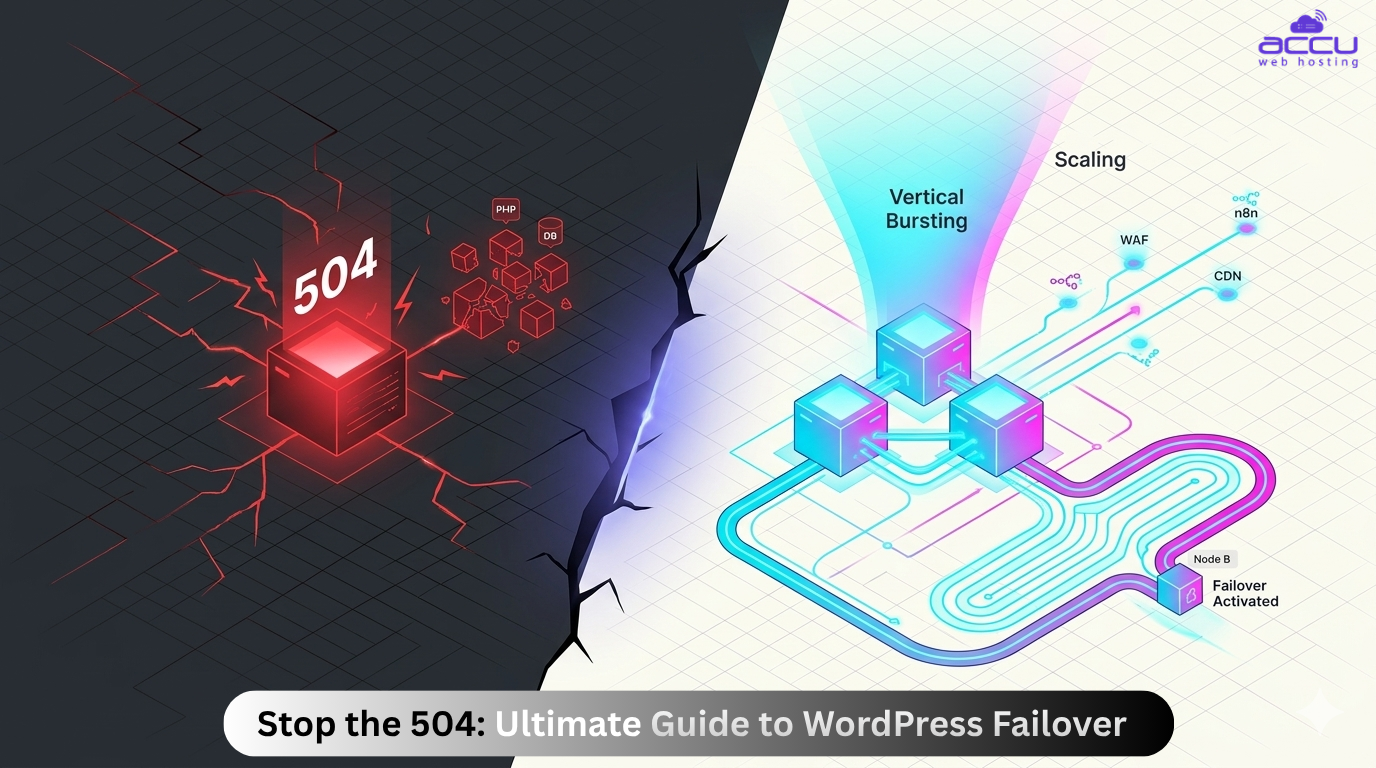
Imagine this: You've spent three months and $5,000 on a perfectly choreographed marketing campaign. Your ads are live, your influencers just posted, and the traffic is flooding in. You click on your site to see the magic happen, but instead of your beautiful homepage, you see it.
504 Gateway Timeout.
In that split second, your ad spend isn’t an investment anymore; it’s a donation to Big Tech. Your customers are clicking away, your bounce rate is skyrocketing, and your brand’s reputation is flickering.
In 2026, the difference between a "Successful Entrepreneur" and a "Stressed Site Owner" often comes down to one thing: Infrastructure. Traditional hosting has a "Single Point of Failure." If that one server fails, your business is in trouble.
This is the definitive guide to WordPress Cloud Hosting with Real-Time Failover, the "insurance policy" for your digital revenue. We aren’t just talking about uptime; we’re talking about Business Continuity.
TL; DR
- The Shift from "Fixed" to "Fluid": Cloud hosting for WordPress is a fluid resource pool that expands during your biggest sales and shrinks when the rush is over, meaning you only pay for the power you actually use.
- Zero-Latency "Edge" Delivery: It’s not just about a fast server anymore; it’s about being everywhere. By serving your WordPress HTML from the network edge, you slash loading times for global visitors, hitting the "Instant-On" speeds that Google’s 2026 algorithms demand.
- The Invisible Security Shield: Instead of a single firewall, your site is protected by an Infrastructure-Level Perimeter. With automated DDoS mitigation and real-time data replication, your site isn't just "online"; it's unreachable by threats.
- AIOps & Self-Healing: The cloud doesn't wait for you to report a bug. Integrated AI Operations (AIOps) predict hardware failures before they happen, silently moving your site to a healthy node without a single millisecond of downtime.
- ROI of Reliability: Every 1-second delay in 2026 equals a 20% drop in conversions. Switching to WP cloud hosting isn't a technical cost; it’s a direct investment in your checkout success and search engine ranking.
Understanding the Origins of the 504 Gateway Timeout
Before you can stop the 504, you have to understand its origin. In 2026, a 504 Gateway Timeout is rarely a sign of a "broken" website; it’s a sign of a "stalling" infrastructure.
The Common Culprits:
- The Upstream Struggle: Explain how your web server (the gateway) waits for your WordPress application (the upstream) but gets tired of waiting.
- The Cost of Silence: Discuss the SEO impact. If Google’s crawlers hit a 504, they don’t just leave; they lower your "Crawl Budget," meaning your new content takes longer to rank.
- PHP Exhaustion: Your site is trying to process too many complex requests (like WooCommerce checkouts or heavy plugins), and all the PHP workers are occupied.
- Database Bottlenecks: Your database struggles to retrieve information fast enough to meet the web server’s deadline.
- Resource Saturation: Sudden traffic spikes have maxed out your CPU or RAM, causing the "upstream" server to give up and time out.
How Does WP Cloud Architecture Physically Stop the 504 Before It Starts?
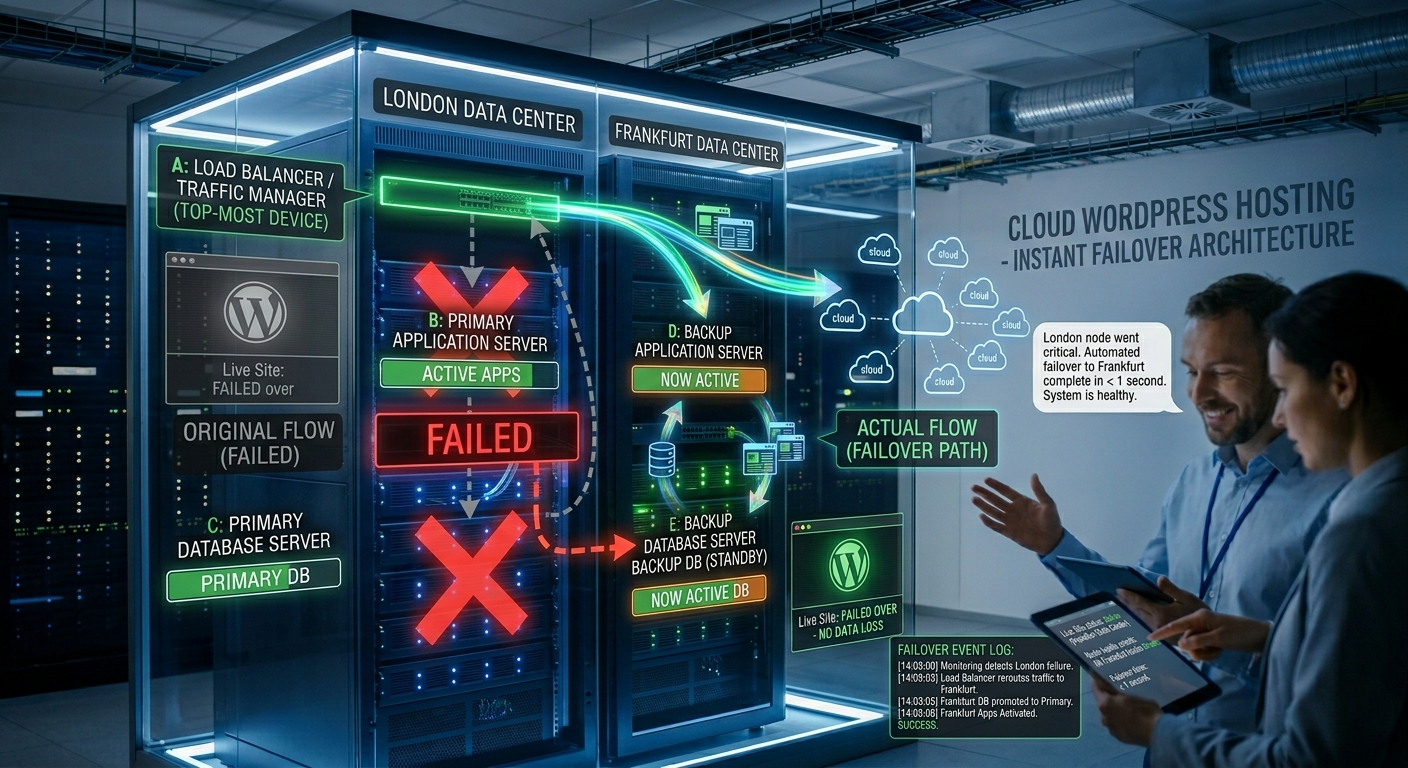
Most hosting tiers rely on a single server. If that server is busy, it times out. Here is how cloud hosting for WordPress rewrites those rules:
- Distributed Processing: Instead of one CPU doing all the work, a cloud cluster shares the load. This prevents any single request from "clogging the pipe" and causing a timeout.
- Isolated PHP Workers: Explain how cloud hosting allows for more PHP workers, the literal "hands" that build your WordPress pages, ensuring there is always someone available to answer a visitor’s request.
In a traditional setup, your website lives on one physical machine. If that machine has a hardware hiccup, your site goes down. Real-Time Failover is the technology that makes your website "immortal."
The "Heartbeat" Mechanism
In a high-availability cloud environment, your site lives on a cluster. A central "controller" monitors the health of every server in that cluster using a heartbeat signal, a digital pulse sent multiple times per second.
1. Continuous Health Monitoring
Our cloud architecture uses a "Heartbeat" monitor. Every few milliseconds, the system checks the status of the node serving your WordPress site. If the heartbeat skips—due to a hardware glitch or a traffic overload—the failover protocol triggers instantly.
2. Data Replication
Your WordPress files and MySQL databases aren't just sitting on one disk. They are mirrored across high-speed NVMe storage clusters. When a failover happens, the new node doesn't have to "find" your data; it’s already there, synchronized in real-time.
3. Traffic Rerouting (Load Balancing)
At the network layer, a Load Balancer detects the healthy nodes and reroutes 100% of the incoming traffic to them. This happens at the DNS or IP level, ensuring the user’s browser stays connected.
WP First
/mo
- 1 Website
- AccuPanel
- 25 GB NVMe
- 2 vCPU Threads
- 2PHP Workers
- 100% Uptime SLA
- 24/7 Priority Support
- One Click Staging
- Ideal for 400k visits/mo
- SSH Access
- Free Daily Backup
- Global Edge Caching
- Global Data Centers
WP Second
/mo
- 1 Website
- AccuPanel
- 55 GB NVMe
- 5vCPU Threads
- 5PHP Workers
- 100% Uptime SLA
- 24/7 Priority Support
- One Click Staging
- Ideal for 1 million visits/mo
- SSH Access
- Free Daily Backup
- Global Edge Caching
- Global Data Centers
WP Third
/mo
- 1 Website
- AccuPanel
- 75 GB NVMe
- 12 vCPU Threads
- 12 PHP Workers
- 100% Uptime SLA
- 24/7 Priority Support
- One Click Staging
- Ideal for 6 million visits/mo
- SSH Access
- Free Daily Backup
- Global Edge Caching
- Global Data Centers
How Vertical Bursting Defeats 504 Errors During Traffic Spikes?
One of the biggest pains for growing businesses is "The Migration." You start on a small plan, get popular, & then have to spend 48 hours migrating to a bigger server.
WP Cloud Hosting solves this with Vertical Bursting. In a 2026 cloud environment, your resources are fluid. If you usually use 4GB of RAM but a sudden Reddit thread or your coffee store sends 50,000 visitors to your store, the cloud "bursts" to 16GB or 32GB instantly to handle the load.
- No Reboots: You don't have to turn the server off to add RAM.
- Pay-as-you-Grow: You only pay for that extra power during the spike, saving you thousands in "idle" server costs over the year.
Speed isn't just a luxury; it’s a Core Web Vital. Google’s 2026 algorithms prioritise "Interaction to Next Paint" (INP) & "Largest Contentful Paint" (LCP).
If you’re unsure if your current setup can handle your next traffic surge, don't guess,get an expert's eyes on it.
How the NVMe and LiteSpeed Stack Erase the "Wait" in Gateway Timeouts?
A 504 error is, at its core, a "waiting game" that the server loses. When your web server (the Gateway) asks WordPress to build a page, it starts a stopwatch. If the database is slow or the file system is sluggish, the stopwatch hits the limit, and the Gateway gives up. To stop the 504, we must eliminate the "wait."
The NVMe Revolution: Beyond the SSD Bottleneck
Most modern hosts have upgraded from HDDs to SSDs, but by 2026, even standard SSDs can become a bottleneck. They are limited by the SATA interface, a legacy "highway" that can only handle so much data at once.
- The NVMe Difference: WP Cloud uses enterprise-grade NVMe (Non-Volatile Memory express). NVMe connects directly to the PCIe bus, communicating straight with the CPU.
- Why this stops 504s: WordPress is a database-driven engine. To load a single page, it may need to perform 50 to 100 "Read/Write" operations. NVMe handles these 100x faster than traditional hosting, ensuring the database never "stalls" the request.
LiteSpeed Enterprise
While Apache and Nginx are reliable, LiteSpeed Enterprise is specifically optimized for the PHP-heavy nature of WordPress.
- Efficient Process Management: LiteSpeed uses a proprietary "LSAPI" to talk to PHP. It is significantly faster at spawning "workers" to handle incoming requests.
- Edge Cache Integration: By using Advanced Edge Caching, your site is mirrored across 260+ global locations. When a visitor arrives, the "Gateway" delivers a pre-built version of the page from the Edge. The request never even touches your server's CPU, leaving 100% of your power available for complex tasks like checkouts or n8n automations.
Deflecting Bot Attacks and DDoS Surges That Trigger Artificial 504 Errors
But speed isn't just about clean code; it’s about keeping the 'noise' of the internet from reaching your server in the first place.
In the modern web, nearly 40% of all internet traffic comes from bots. While some are helpful (like Googlebot), many are malicious scrapers, brute-force attackers, or part of a Distributed Denial of Service (DDoS) network.
On a standard setup, your server has to "process" every single one of these hits. This consumes CPU cycles and fills up your PHP request queue, eventually leading to the dreaded 504 Gateway Timeout.
WP Cloud stops this by moving the battlefield away from your server and onto the Global Network Edge.
1. Web Application Firewall (WAF): The Perimeter Intelligence
A web application firewall is not a simple "block/allow" list. It is an intelligent inspection layer that sits between the public internet and your WordPress installation.
- Virtual Patching: The WP Cloud WAF uses real-time threat intelligence from the millions of sites powered by Automattic. If a new WordPress plugin vulnerability is discovered, a "virtual patch" is applied at the WAF level globally. This means the attack is blocked at the edge before it ever reaches your site’s code.
- Signature-Based Blocking: It instantly identifies "signatures" of common attacks like SQL Injection (trying to steal your database) and Cross-Site Scripting (XSS).
- Why this stops 504s: In a traditional setup, WordPress has to load its core files just to tell a hacker "No." This uses RAM. With a WAF, the "No" happens at the network perimeter. Your server never even knows the attack happened, keeping 100% of your PHP workers available for genuine, revenue-generating customers.
2. DDoS Mitigation
A DDoS attack is a "brute force" attempt to crash your site by overwhelming it with millions of fake requests at once. If your server is a door, a DDoS attack is 10,000 people trying to run through it at once.
- Network-Level Scrubbing: AccuWeb Hosting’s WP Cloud’s infrastructure is built on a massive, globally distributed network. When a DDoS attack begins, the traffic is "scrubbed", meaning the malicious traffic is identified and discarded across dozens of global nodes.
- Traffic Shaping: The system intelligently "shapes" traffic, ensuring that even during a massive attack, the bandwidth required for your actual site to function is prioritized and protected.
3. "Defensive Mode": The Proof-of-Work Shield
Sometimes an attack is so sophisticated that it mimics human behaviour. This is where Edge Cache Defensive Mode comes into play.
- The Proof-of-Work Challenge: When Defensive Mode is activated (either manually or automatically during an extreme surge), the Edge server presents a "challenge" to the visitor’s browser. This isn't a frustrating CAPTCHA with blurry fire hydrants; it’s a silent, background computation that a human browser can solve in milliseconds, but a bot-net (trying to hit thousands of pages at once) cannot.
- 30-Minute to 7-Day Protection: You can toggle this shield on during a high-risk period (like a major product launch) to ensure that only "verified humans" can access the resource-heavy parts of your site.
By filtering out 99.9% of automated noise, the "Gateway" never has to wait for a response from a bogged-down server. The path from the visitor to the content remains clear, and the 504 error is effectively deleted from the equation.
Preventing 504s Through Managed Core Integrity and Expert-Level WordPress Orchestration
In most hosting environments, the WordPress core files are "writable." This means that if a single vulnerability exists in a theme or plugin, a malicious script can modify your wp-includes or wp-admin directories.
This doesn't just steal data; it often breaks the site’s logic, causing the server to "spin" indefinitely and trigger a 504.
- Write-Protected Core Directories: WP Cloud utilises a Read-Only Core architecture. Your WordPress core files are symlinked to a secure, global version managed by Automattic. Because these files cannot be changed by the web server process, it is virtually impossible for malware to "hook" into the heart of your site.
- Predictable Stability: When the core files are guaranteed to be clean, the "Gateway" (NGINX/LiteSpeed) knows exactly what to expect from the "Upstream" (WordPress). This eliminates the "unknown variables" that lead to unexpected timeouts.
Automated Updates Without the "Update Anxiety"
You click "Update" on a major plugin, and your site suddenly displays a white screen. On a high-traffic site, that "White Screen of Death" is a 504 error in disguise.
- Platform-Managed Patching: AccuWeb Hosting’s WP Cloud handles WordPress core updates and critical security patches automatically. But unlike "lazy" hosts that just push the update and hope for the best, our orchestration includes a sophisticated testing layer.
- Compatibility Protection: Security updates are applied instantly to keep the "Invisible Fortress" strong, while feature updates are vetted. This prevents the "Conflict-Crash", where a new version of a plugin conflicts with your PHP version, eating up all available workers and timing out the site.
Staging, Cloning, and the Safety Net
A 504 often happens during "Maintenance Mode." If a migration takes too long or a database update stalls, your site is effectively dead.
- One-Click Staging: WP Cloud provides professional-grade staging environments. You can test your n8n workflows, your new WooCommerce extensions, or your theme changes in an isolated "bubble" that mirrors your production environment perfectly.
- Instant Rollbacks: If a change goes wrong, it allows for an instant rollback. Instead of waiting an hour for a backup to restore from a remote server, the cloud-native snapshots allow you to "rewind" your site to its last healthy state in seconds, stopping the 504 before your customers even notice it.
Conclusion
The journey from a small blog to a high-traffic enterprise is a series of "infrastructure graduations." While Shared Hosting provides the essential starting point and a VPS offers the dedicated power to grow, there comes a moment when a business outgrows the "Single-Node" risk. When every minute of downtime translates to lost revenue, abandoned carts, and a hit to your SEO authority, the conversation shifts from "How much does it cost?" to "How much does it protect?"
In 2026, the standard for a professional website isn't just "online", it’s resilient. Don't let a 504 Gateway Timeout be the ceiling of your success. Build your digital empire on a foundation that is as ambitious as your vision.
Frequently Asked Questions
1. How do I fix a 504 Gateway Timeout on WordPress?
Start by checking your server resources (CPU/RAM) for exhaustion. If resources are clear, investigate slow database queries or PHP-FPM execution limits. For a permanent fix, transitioning to WordPress Cloud Hosting prevents 504s by using Vertical Bursting to automatically inject resources during traffic spikes, ensuring the "Gateway" never times out.
2. What is the difference between VPS and Cloud Hosting for WordPress?
A VPS provides dedicated resources on a single physical server, offering great control and power. WordPress Cloud Hosting, however, distributes your site across a cluster of multiple servers. In a Cloud environment with Real-Time Failover, if one server in the cluster fails, your site instantly moves to a healthy node, maintaining 99.999% uptime.
3. How does Real-Time Automated Failover work?
Real-time automated failover works through a "Heartbeat" monitoring system. The cloud controller checks the health of your server node every millisecond. If a hardware or network failure is detected, the system "fences" the failing node and reroutes your traffic to a "Hot-Standby" server in a different geographical location. Because your data is mirrored across the cloud, this happens in seconds with zero data loss.
4. What is Vertical Scaling vs. Horizontal Scaling?
Vertical Scaling (or Bursting) adds more power (CPU/RAM) directly to your existing server instance without requiring a reboot. Horizontal Scaling adds entirely new server instances and requires a load balancer to distribute traffic. For WordPress, Vertical Scaling is often preferred because it avoids the data-syncing lag and "session" issues that can occur when a site is spread across multiple separate servers.
5. Can Cloud Hosting handle a DDoS attack?
Yes. High-end WordPress Cloud Hosting includes a Web Application Firewall (WAF) and DDoS Mitigation at the network edge. Instead of your server trying to process the malicious traffic, the cloud network "scrubs" the attack at the perimeter. Features like Defensive Mode can also be activated to challenge bots while allowing real human visitors to pass through seamlessly, preventing an "artificial" 504 error.
6. Do I need a developer to manage WordPress Cloud Hosting?
AccuWeb’s Managed WordPress Cloud Hosting is fully orchestrated. This means we handle core updates, security patching, and failover configurations.
About the Author: Jason-Pat
Founder & CTO at AccuWebHosting.com. He shares his web hosting insights at AccuWebHosting blog. He mostly writes on the latest web hosting trends, WordPress, storage technologies, Windows and Linux hosting platforms.