Odoo.sh Alternative with Root Access
Picture your Odoo project six months from now. The custom module your team shipped needs a Python library, the reporting add-on wants a PostgreSQL extension, and someone suggests Redis to speed things up. Every one of those is a server-level change, and every one of them is easier when you hold the keys to the machine.
That is the case for an Odoo.sh alternative with root access, and it is exactly what AccuWeb Hosting Odoo VPS hosting is built around. You get a VPS with Odoo pre-installed, full root access, free SSL, free weekly backups and a team that handles setup, security and routine maintenance. Plans start at $4.95 per month on a 24-month term.
In this guide you will see how the four Odoo Hosting plans compare, what they cost next to Hostinger, DigitalOcean and Akamai servers in the same memory class, how to plan a clean migration and how to pick a location that keeps your users close to the server.
Key takeaways
- Root access. Install Python packages, PostgreSQL extensions, Git and Redis yourself, on a server that AccuWeb Hosting sets up and secures for you.
- Pricing from $4.95/month. Edge (4 GB RAM, 1 vCPU, 50 GB storage) costs $118.80 for the first 24 months, against $155.76 for Hostinger KVM 1 with the same specs.
- Peak at $6.95/month. You get 8 GB RAM, 2 vCPUs and 100 GB of storage, while the 4 GB servers from DigitalOcean and Akamai cost $24/month.
- Included on every plan. Free Odoo Community or Enterprise installation, free SSL, free weekly backups and 1 IP address.
- Easy to evaluate. A 7-day money-back guarantee, 17 locations and ticket first response in under 11 minutes.
Why Consider an Odoo.sh Alternative with Root Access
Odoo.sh is Odoo's own managed platform, and it runs projects inside a fixed container environment. That setup keeps many deployments tidy. Other teams want a different arrangement: a server where they decide which packages, extensions and background services live next to Odoo. For those teams, root access is the feature that settles the choice.
Root access gives your administrators full control of the server's operating system and everything installed on it. When a module needs a system library, you install the library. When a reporting add-on needs a database extension, you enable it. Nothing waits on a platform roadmap, because the machine is yours to configure.
What You Can Install With Root Access
On an AccuWeb Hosting Odoo VPS, your team can set up the tools its modules and workflows depend on:
-
- Custom Python packages. Add the libraries your own modules import.
-
- PostgreSQL extensions. Enable the database features your reports and integrations call for.
-
- Git. Keep custom module code in a repository and pull updates onto the server.
-
- Redis. Add a caching or queue layer when your design uses one.
-
- Your own scripts. Schedule backups, log checks and housekeeping jobs the way your team prefers.
Managed Setup Meets Server-Level Freedom
Root access is most useful when someone else has already done the groundwork. AccuWeb Hosting deploys Odoo for you, configures the operating system, handles routine maintenance and looks after server security. You start with a working Odoo VPS and then shape it to fit your project.
That balance is the heart of managed Odoo hosting with root access: your administrators get the control, and a team with 23+ years in the hosting business looks after the base setup. Odoo Hosting also runs any Odoo version, supports both Community and Enterprise editions and allows unlimited websites and unlimited users.
Odoo Hosting Plans and Pricing
Odoo Hosting plans come in four sizes, so you can match the server to your team and your data. Every price below is the monthly rate on the 24-month term.
| Plan | Best for | RAM | vCPU | Storage | Bandwidth | Price per month |
|---|---|---|---|---|---|---|
| VPS Odoo Edge | Small websites and dev projects | 4 GB | 1 | 50 GB | 250 GB | $4.95 |
| VPS Odoo Peak | Growing sites and ecommerce | 8 GB | 2 | 100 GB | 450 GB | $6.95 |
| VPS Odoo Power | High-traffic sites and agencies | 16 GB | 3 | 200 GB | 650 GB | $9.95 |
| VPS Odoo Supreme | Heavy apps and multiple sites | 32 GB | 4 | 400 GB | 1,000 GB | $19.95 |
Prices are monthly rates on the 24-month term. Every plan includes 1 IP address. Last updated: November 2026.
Edge suits a small company or a development environment, and Peak is a natural fit for a growing business running Odoo for sales, inventory and accounting. Power covers agencies and busier teams, while Supreme gives heavy workloads and multi-site setups 32 GB of RAM and 4 vCPUs to work with.
What Every Plan Includes
-
- Free Odoo installation. AccuWeb Hosting installs Odoo Community or Enterprise for you at no charge.
-
- Free SSL. Customer records, invoices and CRM data travel over an encrypted connection.
-
- Free weekly backups. Quick restore options come with every plan.
-
- Flat, all-inclusive pricing. One monthly rate covers compute resources, SSD storage, bandwidth, regular updates and proactive maintenance.
-
- Guaranteed resources. The resources on your server are yours, with no overselling and no sharing with other users.
Planning to run Odoo Enterprise? Your VPS works with it. You bring your own Odoo Enterprise license, and AccuWeb Hosting takes care of the installation.
Test Everything for 7 Days
Every Odoo Hosting plan is backed by a 7-day money-back guarantee. If you are not fully satisfied, AccuWeb Hosting refunds your payment in full. Use that week to load your real modules, restore a copy of your database and invite a few colleagues to work in the system, rather than only checking the login page.
Find Your Odoo Plan
Compare the four Odoo VPS plans and pick the one that fits your modules, users and budget.
How Odoo Hosting Costs Compare
Price is one of the first questions teams ask, so here are the numbers side by side. The Edge plan matches Hostinger's KVM 1 on memory, processor and storage, which makes this a direct comparison.
| Feature | AccuWeb Hosting Edge | Hostinger KVM 1 |
|---|---|---|
| Monthly price (24-month term) | $4.95 | $6.49 |
| Total for first 24 months | $118.80 | $155.76 |
| Renewal price per month | $9.99 | $11.99 |
| RAM | 4 GB | 4 GB |
| vCPU | 1 | 1 |
| Storage | 50 GB | 50 GB NVMe |
Hostinger figures are based on published KVM 1 pricing for the 24-month term. Last updated: November 2026.
Over the first 24 months, Edge costs $118.80 (24 × $4.95), while KVM 1 costs $155.76 (24 × $6.49). That is $36.96 less, or about 24%. Edge's renewal rate of $9.99 per month is also $2 lower than KVM 1's $11.99.
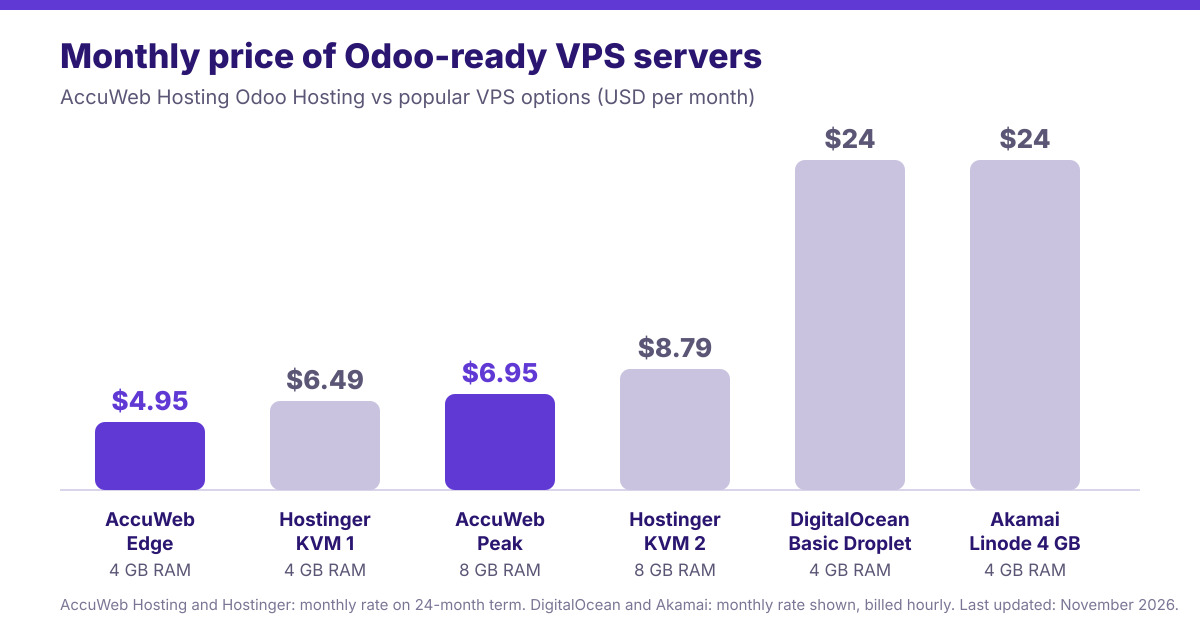
Peak Against 4 GB and 8 GB Servers
If your Odoo database or user count calls for more memory, Peak is the plan to look at. It has 8 GB of RAM, 2 vCPUs and 100 GB of storage. Here it sits next to Hostinger's KVM 2 and the 4 GB servers from DigitalOcean and Akamai:
| Feature | AccuWeb Hosting Peak | Hostinger KVM 2 | DigitalOcean 4 GB | Akamai Linode 4 GB |
|---|---|---|---|---|
| Monthly price | $6.95 | $8.79 | $24 | $24 |
| Billing | 24-month term | 24-month term | Hourly | Hourly |
| RAM | 8 GB | 8 GB | 4 GB | 4 GB |
| vCPU | 2 | 2 | 2 | 2 |
| Storage | 100 GB | 100 GB NVMe | 80 GB SSD | 80 GB SSD |
DigitalOcean and Akamai plans are billed hourly; the monthly rate is shown. Last updated: November 2026.
Peak costs about 21% less per month than KVM 2 ($6.95 against $8.79) with the same 8 GB of RAM, 2 vCPUs and 100 GB of storage. Against the $24 plans from DigitalOcean and Akamai, Peak is about 71% lower, and it brings twice the RAM and 100 GB of storage next to their 80 GB, on the same 2 vCPUs. Edge, in the same 4 GB memory class as those two servers, is about 79% lower at $4.95.
Run a $24 server for 24 months and the total reaches $576. Peak's 24-month total is $166.80, a difference of $409.20 that can go toward an Enterprise license, integrations or an extra test server.
Get More Server for Your Budget
See how much RAM, storage and processing power your budget buys with Odoo VPS hosting.
Full Control With Managed Support
Root access is a powerful capability, and a little organization helps you get the most out of it. These habits work well for teams running Odoo on their own VPS.
Keep a Record of Your Server Setup
Write down your custom modules, Python packages, database extensions and background services, along with the version of each and the module that needs it. Your repository holds the module code, and this short list covers the system-level pieces around it. With both in hand, rebuilding or cloning a server turns into a checklist.
Add Backups on Your Own Schedule
Odoo Hosting includes free weekly backups with quick restore options. Root access lets you add your own schedule on top, for example a nightly database dump and a filestore copy sent to remote storage. Back up the database and the filestore together, because the filestore holds the attachments and files linked to your records.
Then try a restore on a test copy. Open a few attachments and records and confirm everything is where it should be. One rehearsal like that makes any later recovery routine.
Use Git for Your Custom Modules
Odoo Hosting lists GitHub integration among its features, and Git is available on the VPS. Keeping custom modules in a repository gives your team version history, easy rollbacks and a clear route from a test server to production.
Any Odoo Version, Unlimited Users
Because you control the server, you choose the Odoo version that matches your modules. Host unlimited websites and add as many users as your team needs, all under one flat monthly rate. Your software and data stay fully portable, so you keep the freedom to move whenever your plans change.
For a wider look at the software side of the decision, read the Odoo alternatives guide.
Choose From 17 Odoo Hosting Locations
Hosting close to your users shortens the path between them and your application. AccuWeb Hosting Odoo Hosting is available in 17 locations across three regions:
-
- North America (6): Denver, New York, N. Virginia, Ohio, Oregon and Montreal.
-
- Europe and Africa (6): London, Johannesburg, Frankfurt, Dublin, Paris and Stockholm.
-
- Asia Pacific (5): Hyderabad, Singapore, Sydney, Tokyo and Seoul.
Pick the location nearest to most of your team, then check the integrations that connect from elsewhere, such as payment gateways or shipping tools. A short test with real workflows tells you more than any map.
Host Odoo Close to Your Team
Choose a data center near your users and launch your Odoo VPS with root access.
How to Migrate Your Odoo Project to a New Server
A smooth move brings the database, the filestore, your custom code and the required dependencies across together. Start by noting your Odoo version, edition, custom modules, integrations and scheduled jobs. Then follow a simple five-step plan.
-
- Inventory the deployment. Record the Odoo version, edition, modules, integrations and server dependencies.
- Prepare the server. Select an Odoo Hosting plan and install the packages and extensions your deployment requires.
- Restore a test copy. Bring the database, filestore and custom code together in a test environment.
- Exercise business workflows. Test permissions, scheduled jobs, integrations and representative transactions before switching traffic.
- Schedule the cutover. Arrange a final data transfer and keep a recovery route available.
These steps are a planning outline rather than version-specific commands, and your modules and integrations decide the exact order. Rehearse on a copy first, and you will go into the real cutover with a clear checklist.

Match the Server to Your Workload
A user count alone rarely tells you which plan to pick. Imports, reports, integrations and the number of people working at the same moment all load a server differently. Measure your own workload, and read the tips in this discussion on optimizing Odoo performance as you plan. Edge covers small projects, and Peak, Power and Supreme add RAM and vCPUs for bigger ones.
Plan Your Backups Before You Move
Before the switch, take a fresh database and filestore backup. The Odoo backup discussion on the AccuWeb Hosting forum is a useful starting point for building that routine.
Ready to Move Your Odoo Project?
Set up a root-access server, restore a copy of your Odoo data and test it during the 7-day guarantee period.
Support and Track Record Behind Odoo Hosting
A server is only as good as the team behind it. Here is what stands behind Odoo Hosting:
-
- Under 11 minutes. Ticket first response time.
-
- 23+ years. Experience in the hosting business.
-
- 1M+ websites. Deployed and managed.
-
- 100K+ VPS. Deployed and managed.
-
- 4.5 out of 5. Trustpilot rating, based on 223 reviews.
For infrastructure beyond Odoo, explore the full range of VPS hosting options from AccuWeb Hosting.
Conclusion
An Odoo.sh alternative with root access makes sense when your project needs control over server packages, database extensions or background services. AccuWeb Hosting Odoo Hosting combines that control with pre-installed Odoo, managed setup, free SSL and free weekly backups, starting at $4.95 per month on a 24-month term.
-
- Root access lets you install Python packages, PostgreSQL extensions, Git and Redis.
-
- Edge costs $118.80 for the first 24 months, against $155.76 for Hostinger KVM 1 with matching specs.
-
- Peak gives you 8 GB of RAM and 100 GB of storage for $6.95 per month, while 4 GB servers from DigitalOcean and Akamai cost $24.
-
- You get 17 locations, a 7-day money-back guarantee and ticket first response in under 11 minutes.
Choose the plan that fits your workload, restore a copy of your data and see how it runs.
Take Control of Your Odoo Server
Launch Odoo on a VPS with root access, managed setup and a 7-day money-back guarantee.
Frequently Asked Questions
What Is an Odoo.sh Alternative with Root Access?
It is a hosting option that gives you full administrative control of the server running Odoo. With AccuWeb Hosting Odoo Hosting, you get a VPS with Odoo pre-installed and root access, so you can install Python packages, PostgreSQL extensions, Git and Redis yourself.
Can I Install Custom Odoo Modules on Odoo Hosting?
Yes. Root access lets your administrators install custom modules and the system dependencies they need. Check each module's supported Odoo version and package requirements before deployment.
Does Odoo Hosting Include Odoo Installation?
Yes. AccuWeb Hosting installs Odoo Community or Enterprise for free. If you choose Enterprise, you provide your own Odoo Enterprise license.
How Much Does Odoo Hosting Cost?
Edge starts at $4.95 per month on the 24-month term, with 4 GB of RAM, 1 vCPU and 50 GB of storage. Peak is $6.95, Power is $9.95 and Supreme is $19.95 per month on the same term.
Is Odoo Hosting Cheaper Than Hostinger?
Edge costs $4.95 per month against $6.49 for Hostinger KVM 1, with the same 4 GB of RAM, 1 vCPU and 50 GB of storage. That is $36.96 less over the first 24 months. Peak costs $6.95 against $8.79 for KVM 2, with the same 8 GB, 2 vCPUs and 100 GB.
How Do Odoo Hosting Plans Compare With DigitalOcean and Akamai?
The 4 GB servers from DigitalOcean and Akamai cost $24 per month with 2 vCPUs and 80 GB of storage. Peak costs $6.95 per month and offers 8 GB of RAM, 2 vCPUs and 100 GB of storage. Edge, at $4.95, sits in the same 4 GB memory class.
Can I Schedule More Frequent Backups?
Yes. Odoo Hosting includes free weekly backups, and root access lets you add your own nightly database and filestore backups, copied to remote storage if you like.
Can I Use GitHub With My Odoo Server?
GitHub integration is listed among Odoo Hosting's features, and Git is available on the VPS, so you can keep your custom modules in a repository.
Where Can I Host My Odoo Server?
Odoo Hosting is available in 17 locations: six in North America, six in Europe and Africa and five in Asia Pacific.
What Should I Test Before Switching Traffic?
Test a restored database and filestore, custom modules, integrations, permissions and scheduled jobs. Follow one representative transaction from start to finish.
What if I Am Not Satisfied With Odoo Hosting?
A 7-day money-back guarantee backs every Odoo Hosting plan. If you are not fully satisfied, AccuWeb Hosting refunds your payment in full.
About the Author: Jason-Pat
Founder & CTO at AccuWebHosting.com. He shares his web hosting insights at AccuWebHosting blog. He mostly writes on the latest web hosting trends, WordPress, storage technologies, Windows and Linux hosting platforms.