Nextcloud Hosting With LDAP and SSO for Company Logins
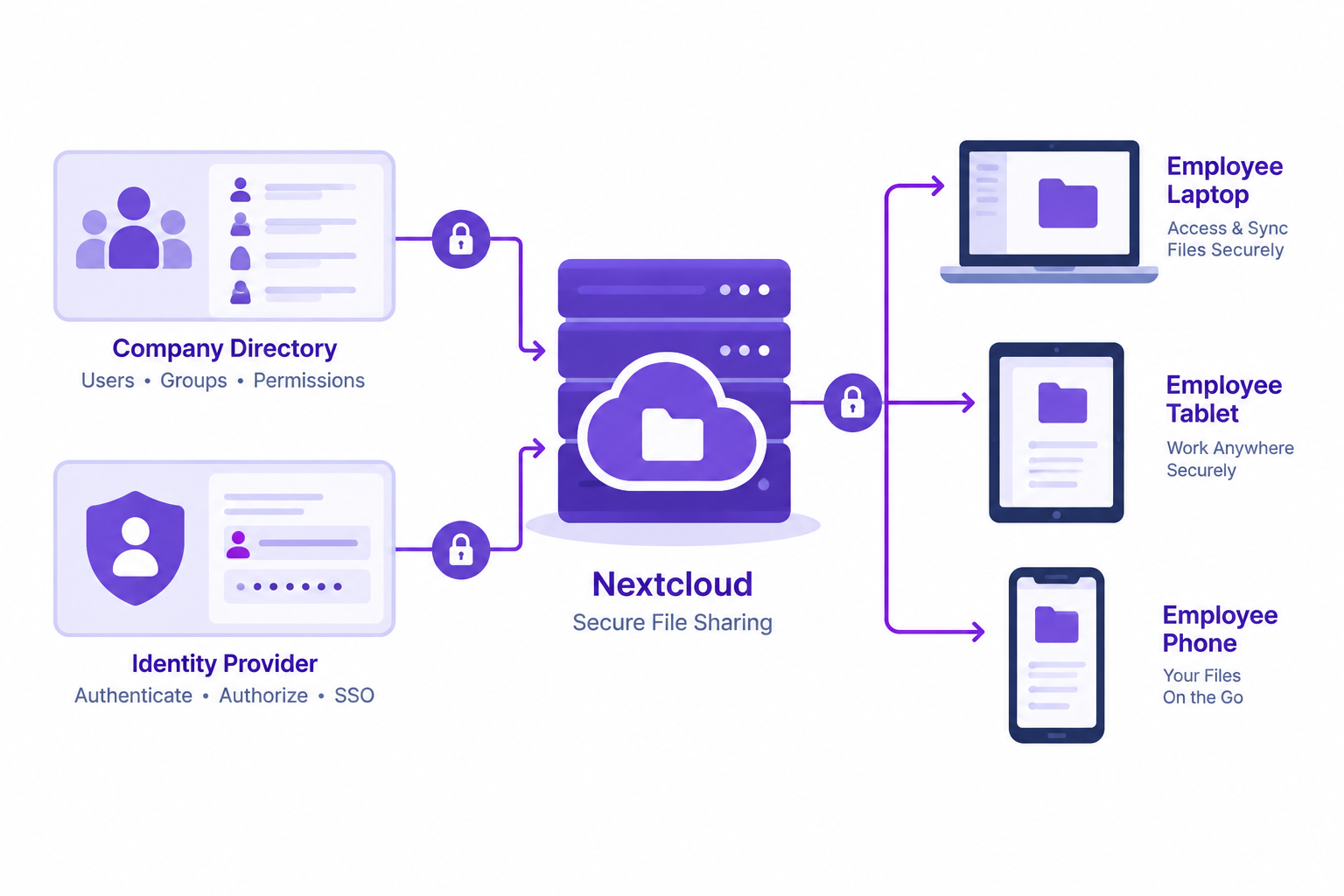
Nextcloud hosting with LDAP and SSO helps employees access company files using existing company identities. It gives IT administrators a way to manage file sharing on their own server while connecting access to a central directory and identity provider.
AccuWeb Hosting installs Nextcloud and configures the server. Administrators control users, accounts, and privileges. Nextcloud VPS hosting runs on plans that start at $4.95 per month.
Key Takeaways
- LDAP connects Nextcloud authentication to an existing company directory.
- SSO uses an identity provider to streamline access across company applications.
- Nextcloud VPS plans start at $4.95 per month with 4 GB of RAM and 30 GB of storage.
- AccuWeb Hosting includes root access, free Let's Encrypt SSL, and DDoS protection.
- AccuWeb Hosting offers 24/7 support and a 7-day money-back guarantee.
Why Company Logins Matter
File sharing works best when staff can find their documents without maintaining another unrelated account. Company logins also give administrators a central place to manage identities when employees join, change roles, or leave.
The need is widespread. Eurostat reported on February 3, 2026 that 52.7% of EU enterprises with at least 10 employees used paid cloud computing services in 2025. Among those cloud users, 71.5% used paid cloud services for file storage.
Moving files to Nextcloud combines a familiar collaboration environment with server administration under your organization's control. Your team still needs a clear approach to authentication, permissions, backups, and ongoing maintenance.
For smaller sites, AccuWeb Hosting also offers cPanel web hosting. A Nextcloud VPS focuses on the file-sharing environment and its server configuration.
LDAP and SSO Explained
LDAP connects Nextcloud to a directory that stores company users and groups. Nextcloud's LDAP application supports Active Directory and lets directory users authenticate with their LDAP credentials.
SSO delegates sign-in to an identity provider. Staff authenticate through that provider and then access connected applications according to its policies. An existing identity provider can also apply its own authentication requirements, such as multifactor authentication.
These approaches are related, but they are not interchangeable. LDAP addresses directory connections and credential authentication. SSO describes a sign-in experience that relies on an identity provider.
Nextcloud's SSO & SAML app can work with its LDAP user provider. In that arrangement, design the identity mapping carefully so the SSO identity resolves to the intended Nextcloud user.

Connect Your Company Accounts
Explore Nextcloud hosting for an environment that supports LDAP and SSO integration.
Plan Your Directory Integration
Start with an inventory of the directory, identity provider, and applications your staff already use. Identify the directory groups that need access and the people responsible for approving membership.
Choose a stable, unique user identifier for the integration. Email addresses and display names can change, so an identifier tied to the directory account helps prevent unintended identity mismatches.
Document the network path between Nextcloud and the directory. Use encrypted directory connections, restrict network access, and give the directory service account only the permissions required for lookups.
Decide where the server should run based on staff location, organizational requirements, and your network design. AccuWeb Hosting's Nextcloud VPS runs in 16 locations worldwide, including the USA, UK, and Europe.
Compare Authentication and Hosting Features
Choose LDAP when the immediate goal is authentication against a company directory. Add SSO when you want an identity provider to handle the sign-in flow across applications. Many organizations use both as parts of one identity architecture.
Before selecting an approach, check that your identity provider, directory, and Nextcloud configuration use compatible identifiers. Also decide how administrators will access the server if the normal identity service is unavailable.
The AccuWeb Hosting Nextcloud VPS includes the following features on every plan.
| Feature | Nextcloud VPS |
| Identity integration | LDAP and SSO support |
| Server access | Root access |
| SSL | Free Let's Encrypt SSL |
| Network protection | DDoS protection |
| Support | 24/7 support |
| Guarantee | 7-day money-back guarantee |
Choose a Plan for Your Team
Nextcloud needs at least 1 GB of RAM and 20 GB of disk space, and a team deployment needs more. Size the server around active users, stored data, file sizes, and concurrent activity.
| Plan | RAM | vCPU | Storage | Bandwidth | Price per month |
| VPS Edge | 4 GB | 1 vCPU | 30 GB | 250 GB | $4.95 |
| VPS Peak | 8 GB | 2 vCPU | 50 GB | 450 GB | $6.95 |
| VPS Power | 16 GB | 3 vCPU | 70 GB | 650 GB | $9.95 |
| VPS Supreme | 32 GB | 4 vCPU | 100 GB | 1,000 GB | $19.95 |
These plans run in Denver, New York, and Hyderabad and include full root access. The other locations use the global VPS Earth +, VPS Saturn +, VPS Sun +, and VPS Galaxy + plans. See the full list of Linux VPS plans. Nextcloud Enterprise also runs on every plan with your own license.
Choose Your Nextcloud Environment
Review Nextcloud VPS options alongside your identity and capacity requirements.
Set Up Nextcloud With LDAP and SSO
Use a test group before opening the service to the whole company. The exact settings depend on your directory, identity provider, and Nextcloud version.
- Prepare the server. Choose the hostname and establish HTTPS for the Nextcloud installation.
- Prepare the directory. Create a restricted service account and identify the user and group search paths.
- Configure LDAP. Enable the LDAP user integration and enter the encrypted connection and directory search settings.
- Test users and groups. Check that the intended accounts and groups resolve correctly before expanding access.
- Configure SSO. Connect the identity provider and map its user identifier to the corresponding Nextcloud account.
- Run acceptance tests. Test sign-in, permissions, account changes, and recovery with representative staff accounts.
AccuWeb Hosting installs Nextcloud and configures the server. Your administrators then manage the identity integration and access model for the organization. Use the Nextcloud VPS service as the starting point for that deployment.
Keep a recovery procedure outside the normal SSO path. Store emergency administrative credentials securely, restrict their use, and test the documented recovery process before production.

Manage Users and Groups
Nextcloud LDAP user and group sync starts with a clear understanding of directory structure. Define which users can enter Nextcloud and which directory groups represent teams, departments, or project roles.
Keep authentication separate from authorization. A successful company login establishes who the user is. Nextcloud permissions then determine which files and shared resources that user can access.
Test a new employee, a role change, and an employee departure. Check how the directory change appears in Nextcloud and how existing file ownership and shares are handled. Record the results in your onboarding and offboarding procedures.
Restrict broad directory searches when only a subset of staff needs the service. Review group membership regularly, especially for sensitive projects. Avoid assuming that removing a directory account automatically resolves every file ownership or retention decision.
With AccuWeb Hosting's Nextcloud environment, customers control users, accounts, and privileges. Assign an internal owner to review those settings after each organizational change.

Protect Company Sign-Ins
Use HTTPS for employee access and encrypted connections to directory services. Limit administrative access to authorized staff, and protect the identity provider with authentication policies appropriate to your organization.
The UK government's Cyber Security Breaches Survey 2025/26, published on April 30, 2026, reported that 47% of businesses used two-factor authentication for networks or applications. Apply multifactor authentication through your identity provider where your deployment supports it, and test the complete sign-in flow.
Review the security of directory service credentials and SSO signing certificates. Store secrets securely, track certificate expiration, and document how to rotate them without interrupting employee access.
AccuWeb Hosting includes free Let's Encrypt SSL and DDoS protection with its Nextcloud VPS service. These features complement your own identity, permission, and server maintenance practices.
Monitor authentication events and administrative changes. A failed login can indicate a configuration issue, an expired credential, or an unauthorized attempt. Give your operations team a clear escalation path for each case.
Move Staff Files Safely
Inventory shared folders before migration. Identify their owners, access groups, storage requirements, and retention needs. Remove obsolete material according to company policy before copying files.
Run a pilot with a representative team. Compare sample files and permissions before and after the transfer. Test browser access, staff workflows, and any desktop or mobile clients your organization plans to use.
Plan a cutover window and tell employees which location becomes authoritative. Avoid parallel edits across the old and new systems during the final transfer. After cutover, retain an appropriate recovery copy under your organization's retention policy.
Use this checklist before inviting the full workforce:
- Identify owners for shared folders and sensitive data.
- Test directory authentication and SSO with pilot accounts.
- Review group permissions and external sharing rules.
- Verify file integrity after the migration.
- Document backup restoration and account recovery.
- Communicate the new sign-in process to staff.
When planning the rollout, compare your expected users, storage needs, and transfer workload with the plans above, which start at $4.95 per month on Nextcloud hosting.
Prepare Your File Migration
Start your rollout with Nextcloud VPS hosting and a documented access plan.
Operate and Maintain Your Deployment
Assign ownership for the server, Nextcloud application, directory connection, and identity provider. These responsibilities can belong to different teams, but each team needs a documented contact and escalation process.
Maintain a schedule for application and server updates. Test changes against your LDAP and SSO configuration before applying them broadly. Review compatibility when changing the identity provider or its authentication policies.
Back up the files, database, configuration, and other components required for recovery, and review the VPS backup options. Test restoration in an isolated environment. A backup only becomes a practical recovery plan when your team knows how to restore and validate it.
AccuWeb Hosting offers 24/7 support for its Nextcloud VPS service. Keep your internal runbook current so support requests include the affected service, error details, and recent changes.

Choose Nextcloud Hosting With LDAP and SSO
Start with your identity architecture, then size the server for the work it must perform. Consider active users, stored data, file sizes, concurrent activity, and expected growth. Include backup storage and recovery procedures in the wider design.
Check that your directory and identity provider teams can support the integration. Decide who owns user provisioning, group reviews, certificate renewals, and incident response. A reliable login experience depends on each of those processes.
AccuWeb Hosting offers a 7-day money-back guarantee for its Nextcloud VPS. Plans start at $4.95 per month with VPS Edge, and the Nextcloud hosting plans scale up to VPS Supreme with 32 GB of RAM.

Frequently Asked Questions
Can Nextcloud use existing company accounts?
Yes. Nextcloud can authenticate directory users through its LDAP application. An SSO integration can also connect sign-in to a compatible identity provider.
Can I connect Nextcloud to Active Directory?
Yes. Nextcloud's LDAP application supports Active Directory. Configure the directory connection, search paths, and user filters for your environment.
Is LDAP the same as single sign-on?
No. LDAP connects applications to directory information and supports directory credential authentication. SSO uses an identity provider to handle sign-in across connected applications.
Can Nextcloud use LDAP and SSO together?
Yes. Nextcloud's SSO & SAML app can be combined with its LDAP user provider. Map identities consistently so each person reaches the correct account.
How do Nextcloud groups control file access?
Administrators use groups to organize users and assign access to shared resources. Review directory membership and Nextcloud permissions together when roles change.
Does AccuWeb Hosting install Nextcloud?
Yes. AccuWeb Hosting installs Nextcloud and configures the server. Customers control their users, accounts, and privileges.
What happens if the identity provider is unavailable?
Users relying on that provider can lose their normal sign-in path. Maintain and test a secure administrative recovery procedure before an outage occurs.
Does the VPS support Nextcloud Enterprise?
Yes. AccuWeb Hosting VPS plans support Nextcloud Enterprise. The Enterprise license is separate from the VPS service.
How much does Nextcloud VPS hosting cost?
Plans start at $4.95 per month with VPS Edge. VPS Peak costs $6.95, VPS Power $9.95, and VPS Supreme $19.95, and every plan has a 7-day money-back guarantee.
Bring Company Logins to Nextcloud
Nextcloud hosting with LDAP and SSO gives your organization a practical way to connect staff file sharing with company identities. Plan directory filters, identity mapping, group permissions, and recovery before inviting the full workforce.
With a tested rollout and clear operating responsibilities, your team can use company logins while administrators retain control of the Nextcloud environment.
Bring Company Logins to Nextcloud
Explore AccuWeb Hosting Nextcloud VPS plans from $4.95 per month for your file-sharing deployment.
About the Author: Jason-Pat
Founder & CTO at AccuWebHosting.com. He shares his web hosting insights at AccuWebHosting blog. He mostly writes on the latest web hosting trends, WordPress, storage technologies, Windows and Linux hosting platforms.