Self Hosted Ollama for Continue Code Assistant: Setup Guide
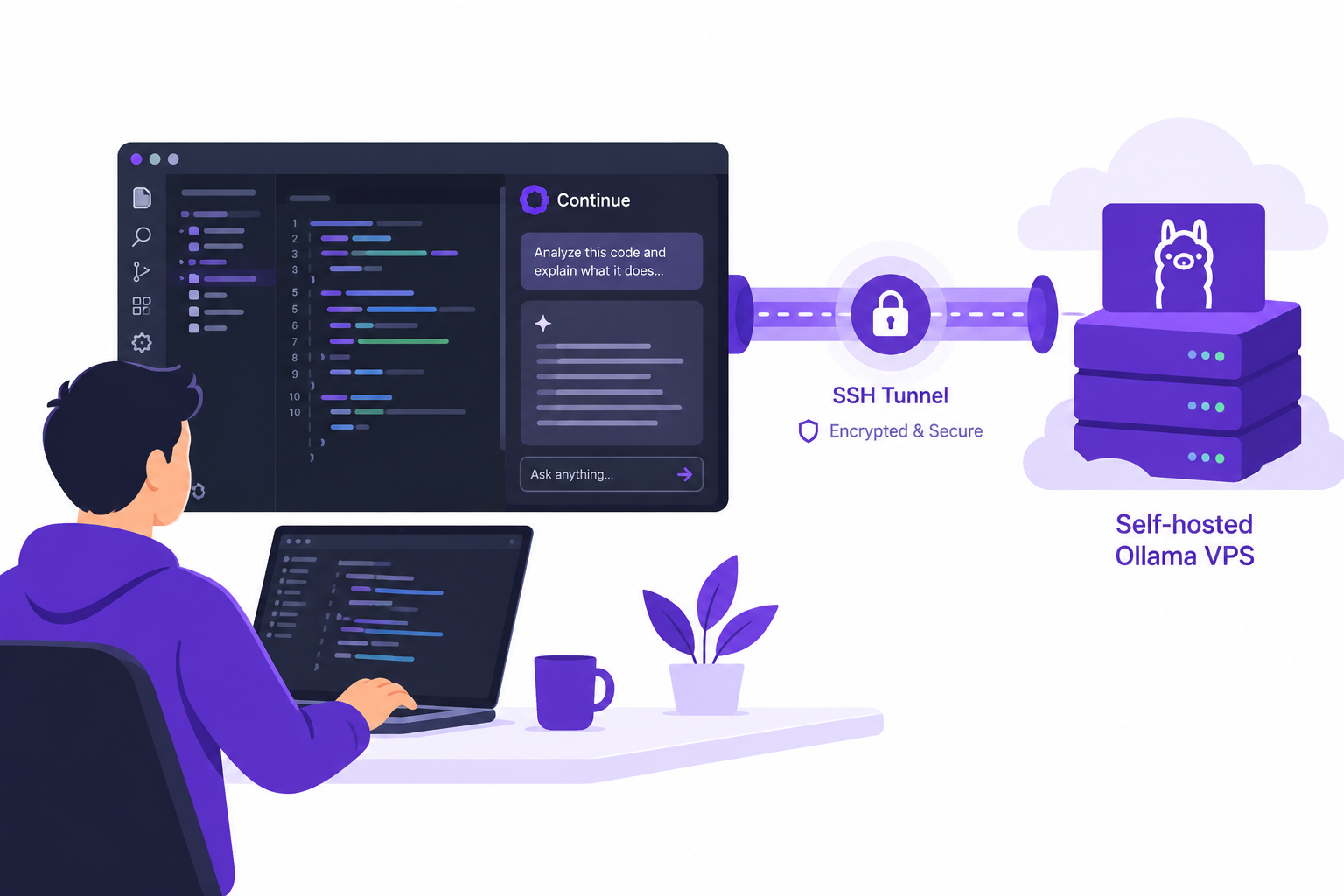
Self hosted Ollama for Continue Code Assistant lets developers run AI models on a server they control and connect from VS Code. An SSH tunnel keeps the Ollama API off the public internet while Continue sends prompts to the remote model.
AccuWeb Hosting's Ollama VPS hosting runs on VPS plans that start at $4.95 per month and come with Docker pre-installed, full root access, and a REST API. This guide covers a private connection, model configuration, testing, and team operations.
Key Takeaways
- Run Ollama on a VPS and connect Continue through an SSH tunnel.
- Keep the published Ollama port bound to 127.0.0.1:11434 on the server.
- Use Continue's autocomplete role for inline suggestions.
- VPS plans for Ollama start at $4.95 per month with 4 GB of RAM and 30 GB of storage.
- Every plan includes Docker, root access, and 24/7/365 support.
- Disable Ollama cloud features and review other tools separately before handling sensitive code.
How Self Hosted Ollama for Continue Code Assistant Works
Continue is a VS Code extension that sends requests to a configured model provider. Ollama runs the model and exposes an API. The model can run on a remote VPS while developers work on their own computers.
In this setup, Continue connects to a local address on the developer's computer. SSH forwards that connection to the server's local Ollama port. Code and prompts travel through the encrypted SSH session instead of a public Ollama endpoint.
The VPS is still a remote system. Its administrator controls the server, but the hosting provider operates the underlying infrastructure. Review your organization's policies before sending confidential material to any hosted environment.
Ollama also provides an OpenAI-compatible endpoint at /v1/chat/completions, so clients such as Continue switch to your own instance by changing the base URL. Your Ollama hosting service supports deployment with the official Ollama Docker image.

Why Developers Choose a Private Model Server
A self-hosted server gives a team control over its model selection, access rules, and deployment process. It also gives administrators a central place to manage model updates and investigate performance.
Privacy matters because coding assistants handle more than isolated questions. A request can include source files, nearby code, error messages, and developer instructions. Treat those inputs as sensitive whenever the underlying project requires it.
In Stack Overflow's 2026 Developer Survey, fielded from June 23 to August 5, 2026, 66% of respondents used AI coding assistants or coding agents. Among those users, 73% used them daily. In Stack Overflow's 2025 survey, 81% of respondents agreed they had security and data-privacy concerns about AI agents.
Self-hosting reduces reliance on a public model API for inference. It does not automatically disable every extension, telemetry setting, repository integration, or external network connection. Review each component and apply your organization's data-handling rules.
Build Your Private Model Environment
Explore Ollama VPS hosting for a server you can configure around your workflow.
Choose a Server and Model
Start with the model and workload, not a generic server size. A larger model needs more memory and storage. Concurrent developers, longer prompts, and faster response targets also increase resource demand.
| Model size | Suggested hardware |
| 7B parameters or fewer | CPU-only VPS with 4 GB to 8 GB of RAM, such as VPS Edge or VPS Peak |
| 13B to 70B parameters | GPU-accelerated VPS for faster responses |
| Small quantized models | As little as 2 GB of RAM for testing |
Choose a coding model that supports your intended language and workflow. A small model is a useful starting point for testing the connection. Evaluate its suggestions against your own repositories before making it a team standard.
CPU-based inference works for initial tests, but response times depend on the model and available hardware. If you need a GPU, select a plan that supports it and configure the container accordingly.
Memory is the main constraint for a model server, so start with RAM. The VPS plans below all include full root access, so you can install Docker containers and mount model volumes.
| Plan | RAM | vCPU | Storage | Bandwidth | Price per month |
| VPS Edge | 4 GB | 1 vCPU | 30 GB | 250 GB | $4.95 |
| VPS Peak | 8 GB | 2 vCPU | 50 GB | 450 GB | $6.95 |
| VPS Power | 16 GB | 3 vCPU | 70 GB | 650 GB | $9.95 |
| VPS Supreme | 32 GB | 4 vCPU | 100 GB | 1,000 GB | $19.95 |
VPS Edge, VPS Peak, VPS Power, and VPS Supreme run in Denver, New York, and Hyderabad. The United Kingdom, Germany, and Singapore locations use the global VPS Earth +, VPS Saturn +, VPS Sun +, and VPS Galaxy + plans. A 1.5B coding model suits VPS Edge, and the larger plans give room for bigger models and more developers.
AccuWeb Hosting's 16+ global data-center network includes the United States, United Kingdom, Germany, India, and Singapore. Choose the location closest to your team.
Prepare the Server and Workstation
For this example, use a VPS with Docker installed and SSH access configured. Install VS Code and the Continue extension on the developer workstation. You also need permission to download the selected model.
Use an individual SSH account and key for each developer. Protect private keys with passphrases, and use your organization's normal account provisioning and removal process. Restrict SSH access through your firewall and authentication policies.
The example uses the server address YOUR_SERVER and account YOUR_USER. Replace both with your own values. Commands assume a shell with Docker access on the server and an SSH client on the workstation.
Keep operating system packages and Docker updated. Decide where persistent model data belongs, who can administer the server, and how your team will recover its configuration after a failure. Review VPS backup options as part of that plan, or explore other Linux VPS hosting plans if you run additional services on the same server.
Set Up Ollama and Continue
These steps publish the container port only on the server's loopback interface. The SSH tunnel then makes that private port available to Continue on the workstation.
- Connect to the VPS. Open an SSH session with
ssh YOUR_USER@YOUR_SERVER. - Start Ollama. Run the Docker command below on the server.
- Pull a coding model. Run
docker exec ollama ollama pull qwen2.5-coder:1.5bon the server. - Test the server locally. Run
curl http://127.0.0.1:11434/api/tagson the server and check that the model appears. - Open the tunnel. Run the SSH forwarding command below on the workstation and leave it running.
- Configure Continue. Add the model configuration shown below to your local Continue configuration.
- Test in VS Code. Ask a question in Continue chat and check inline completion in a test file.
Run this command on the server. The named volume keeps model files outside the container's writable layer.
docker run -d --name ollama --restart unless-stopped \
  -p 127.0.0.1:11434:11434 \
  -e OLLAMA_HOST=0.0.0.0:11434 \
  -e OLLAMA_NO_CLOUD=1 \
  -v ollama-data:/root/.ollama \
  ollama/ollama
Ollama listens on the container interface so Docker can reach it. Docker publishes that port only on the server's loopback interface. The OLLAMA_NO_CLOUD=1 setting turns off Ollama's cloud models and web search. It does not govern other software.
Run this command on your workstation, not inside the VPS session:
ssh -N -L 11434:127.0.0.1:11434 YOUR_USER@YOUR_SERVERLeave the terminal open while using Continue. On the workstation, test the tunnel with curl http://127.0.0.1:11434/api/tags. The response should include the downloaded model.

Deploy a Model Server
Use AccuWeb Hosting Ollama VPS hosting to build a Docker-based environment for your developers.
Configure Continue for the Remote Server
Continue's local configuration file is ~/.continue/config.yaml on macOS and Linux. On Windows, it is %USERPROFILE%\.continue\config.yaml. Open the appropriate file and add a model entry.
The following example assigns the same model to chat and autocomplete. If your file already has the name, version, and schema lines and a models list, add only the model entry to that list instead of creating a duplicate key.
name: Private Ollama
version: 1.0.0
schema: v1
models:
  - name: Private Ollama Coder
    provider: ollama
    model: qwen2.5-coder:1.5b
    apiBase: http://127.0.0.1:11434
    roles:
      - chat
      - autocomplete
The model ID must match a model installed on the server. The apiBase points to the workstation end of the SSH tunnel, not directly to the VPS public address. A small model suits autocomplete, and a larger coding model suits chat when your hardware allows it.
Reload VS Code or select the updated configuration in Continue if the change does not appear immediately. Choose the configured model for chat and check that autocomplete uses the intended model role.
If another program already uses the workstation port, choose a different local port. For example, forward 11435 locally to 11434 on the server, then update apiBase to match.
Secure the Ollama Connection
Ollama's local API does not require authentication. Never assume that a public IP address and an obscure port protect it. Publishing the API broadly can expose inference access and the data sent to it.
The tunnel approach avoids a publicly reachable Ollama port. Keep the server firewall restrictive, audit SSH accounts, and remove access promptly when a developer leaves the team. Restrict administrative access to trusted operators.
For a larger deployment, a private network or authenticated reverse proxy can replace individual tunnels. Configure encryption, authentication, authorization, and logging deliberately, and use HTTPS with a certificate from SSL certificates where the proxy faces users. Test those controls before connecting real project data.
Review logs and diagnostic tools for sensitive content. Avoid recording full prompts or generated code unless your policy requires it. Set retention rules and control access to any operational records.

Validate Privacy and Access
Before using production code, check the full request path. A private inference server does not prove that every VS Code extension or integration stays local. Inventory the tools that can read the workspace and review their network behavior.
- Use a test repository without confidential material for initial validation.
- Check that the Ollama port is not reachable from the public internet.
- Verify that Continue points to the local tunnel address.
- Review Continue, VS Code, and extension telemetry settings.
- Restrict server access to approved developer accounts.
- Document model downloads and any external network access.
- Set rules for prompt logging and access to logs.
- Test account removal and SSH key revocation.
Document which model and configuration each team uses. Repeat the checks after changing the model, network topology, extension configuration, or deployment method.
Operate a Shared Team Server
A shared Ollama code model server can simplify model management, but it also creates a shared workload. Establish an owner for updates, access requests, capacity review, and incident response.
Set a baseline with representative tasks. Measure response time for chat and inline completion separately, then test concurrent requests. A model that feels responsive for one developer can behave differently during a busy team session.
Use a staging environment to test model and container updates. Keep a record of the previous configuration and model version so your team can roll back a problematic change. Back up configuration files and other data your recovery plan requires.
AccuWeb Hosting offers 24/7/365 support, with a ticket first response time under 11 minutes. Your team should also document its own responsibilities for model configuration, SSH access, and application-level troubleshooting.
Troubleshoot Common Connection Problems
The API Does Not Respond
Check docker ps and docker logs ollama on the server. Test the server's loopback API before testing the workstation tunnel. This separates container problems from SSH problems.
The Tunnel Cannot Bind the Local Port
Another local Ollama instance or application can occupy the port. Stop that application or use a different workstation port. Update Continue's apiBase to use the same local port.
Continue Cannot Find the Model
Check docker exec ollama ollama list on the server. Compare the model ID with the configuration, including its tag. Then verify that the API response travels through the tunnel.
Suggestions Are Slow or Missing
Check server resource use and test with a smaller coding model. Confirm that the model has the autocomplete role and that autocomplete is enabled in Continue. Test chat separately to narrow the problem.
Daily use makes reliability important. In its 2026 Developer Survey, Stack Overflow reported that 73% of respondents who used coding assistants or agents used them daily.
Frequently Asked Questions
Can Continue connect to a remote Ollama server?
Yes. Configure Continue's Ollama provider with the model ID and an apiBase. An SSH tunnel lets that address remain local to the workstation while forwarding requests to the remote server.
Does this setup send code to a public AI API?
Requests sent through the configuration shown here go to your Ollama server. Other extensions, integrations, and settings can use external services, so review them separately.
How much does an Ollama VPS cost?
VPS plans for Ollama start at $4.95 per month with VPS Edge, which has 4 GB of RAM and 1 vCPU. VPS Peak costs $6.95, VPS Power $9.95, and VPS Supreme $19.95.
Does Ollama require an API key?
Ollama's local API does not require authentication. Protect access with a private connection and appropriate account controls rather than exposing the API directly.
Can I use Continue for inline code completion?
Yes. Add the autocomplete role to a suitable model entry and enable the relevant Continue functionality in VS Code.
Can different developers use the same server?
Yes. Give each developer an individual authorized connection and monitor capacity. Apply your team's access, logging, and data-handling policies consistently.
Do I need a GPU to run Ollama?
No. A CPU-only VPS with 4 GB to 8 GB of RAM runs models of 7B parameters or fewer. Models from 13B to 70B parameters respond faster on a GPU-accelerated plan.
Where does Continue store its configuration?
It uses ~/.continue/config.yaml on macOS and Linux, and %USERPROFILE%\.continue\config.yaml on Windows.
How do I keep model files when recreating the container?
Use a persistent Docker volume for Ollama's model directory, as shown in the setup command. Include that data in your recovery planning where appropriate.
How do I disable Ollama cloud features?
Set OLLAMA_NO_CLOUD=1 in the Ollama environment, then restart Ollama. This turns off Ollama's cloud models and web search. It does not change the behavior of other applications or integrations.
Plan Your Private Coding Assistant
Self hosted Ollama for Continue Code Assistant gives your developers a practical way to use a model server they control from VS Code. Start with a private SSH tunnel, test a coding model, and verify each part of the data path.
For a team deployment, document access, measure performance, and review extension settings regularly.
Start Your Ollama Deployment
Explore AccuWeb Hosting Ollama VPS hosting from $4.95 per month for your private coding assistant workflow.
About the Author: Jason-Pat
Founder & CTO at AccuWebHosting.com. He shares his web hosting insights at AccuWebHosting blog. He mostly writes on the latest web hosting trends, WordPress, storage technologies, Windows and Linux hosting platforms.