WordPress 7 Is Here: Features, AI & Performance Explained
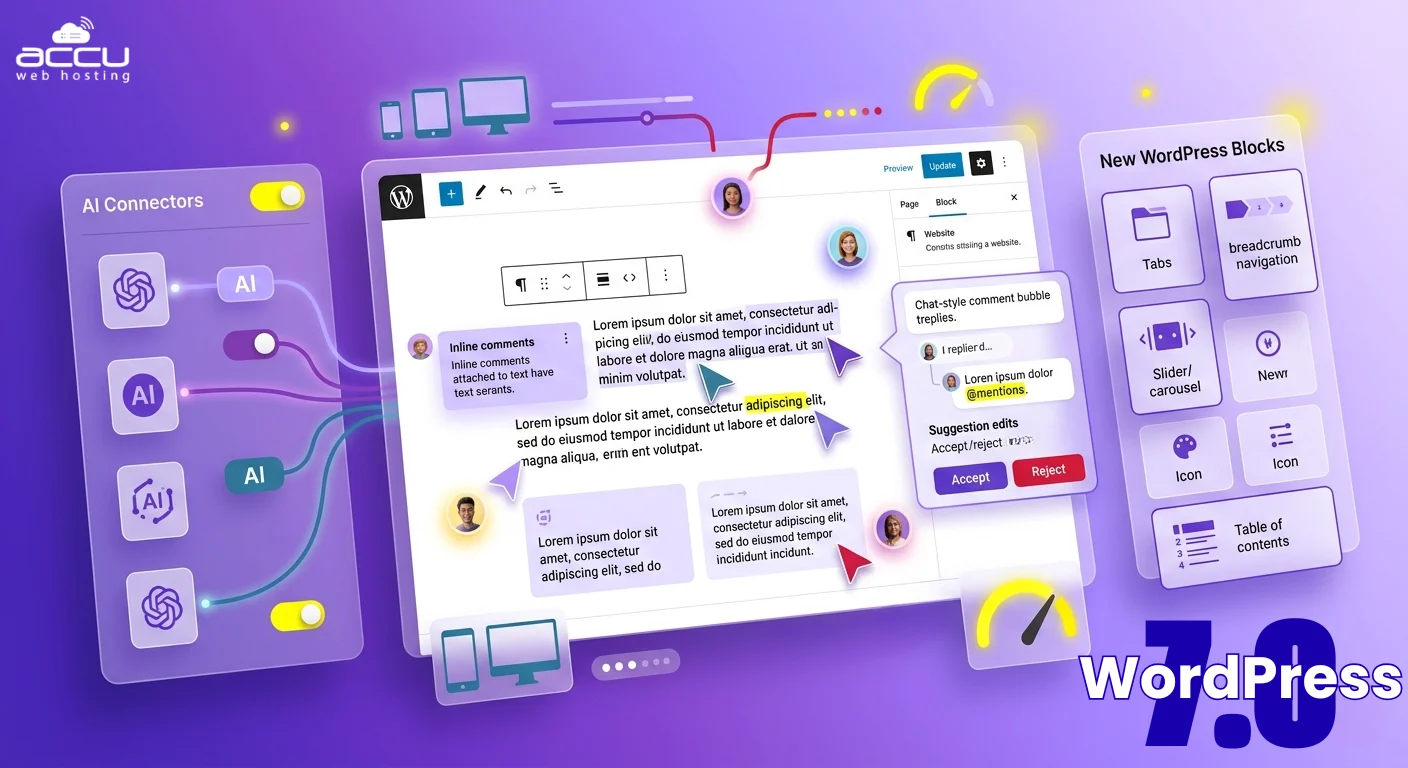
If you’ve used WordPress for a while, you already know the pattern: a new version, a few improvements, maybe some UI tweaks, and more.
Wordpress 7.0 Breaks That Pattern
This update doesn’t focus on surface-level changes. Instead, it targets the biggest friction points users actually face: slow editing workflows, lack of collaboration, and too much dependence on plugins for basic functionality.
With WordPress 7.0, the platform starts behaving less like a traditional CMS and more like a modern website-building system:
- You can work on content with your team in a more connected way
- You get more control directly inside the editor without relying on multiple tools
- And overall performance feels more optimized for growing, dynamic websites
But here’s what makes this release important for you:
It directly impacts how fast you can build, update, and scale your website.
For businesses, that means quicker launches and easier management.
For developers and agencies, it means more flexibility with fewer limitations.
And for anyone planning to grow online, it means fewer bottlenecks in the long run.
In this article, we’ll go beyond just listing features. We’ll break down what WordPress 7.0 actually changes, how it affects your website in real-world scenarios, and what you should do to make the most of it.
What Is WordPress 7.0?
WordPress 7.0 is the next major evolution of the world’s most popular content management system, but instead of just adding features, it focuses on transforming how websites are built and managed from the inside out.
At its core, WordPress 7.0 continues to be an open-source platform that allows you to create websites, blogs, and online stores. But the difference lies in how much control and flexibility you now get without depending heavily on plugins or external tools.
1. Real-Time Collaboration
One of the most significant shifts in WordPress 7.0 is the move toward real-time collaboration, something that has been missing from WordPress for years. Traditionally, content creation in WordPress has been a single-user process—only one person could edit a post at a time, forcing teams to rely on workarounds like Google Docs, manual coordination, or constant back-and-forth edits. This often slowed down workflows and increased the risk of overwritten changes.
With WordPress 7.0, that experience is evolving. The goal is to introduce a more dynamic editing environment where multiple users can work on the same page simultaneously, see updates as they happen, and collaborate more efficiently without leaving the platform. Early development suggests that users may be able to view each other’s activity in real time, reducing confusion and making teamwork smoother and faster.
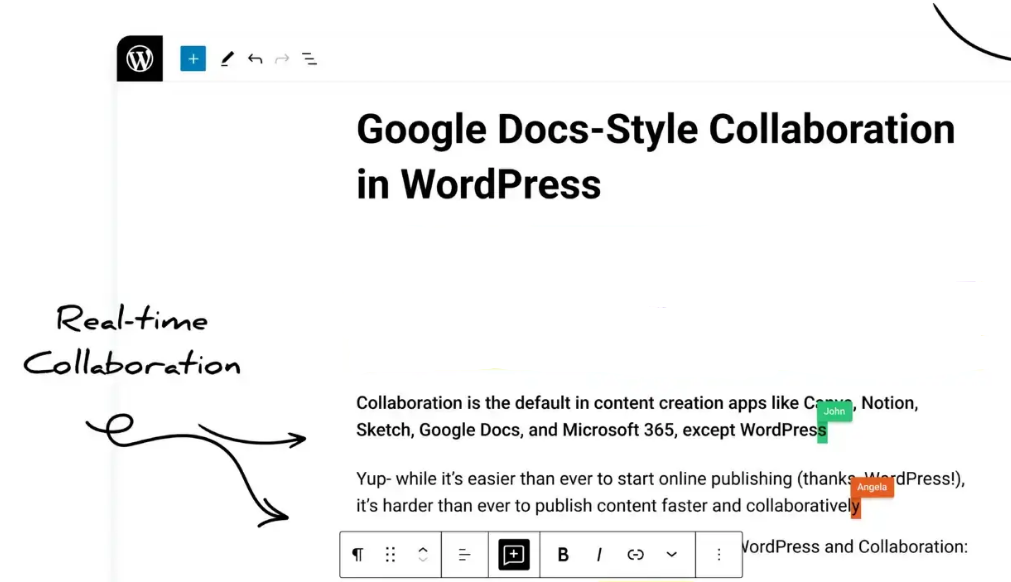
Note: This feature is still developing and may initially support limited simultaneous editing rather than a fully seamless experience like Google Docs.
2. WordPress 7.0 Notes
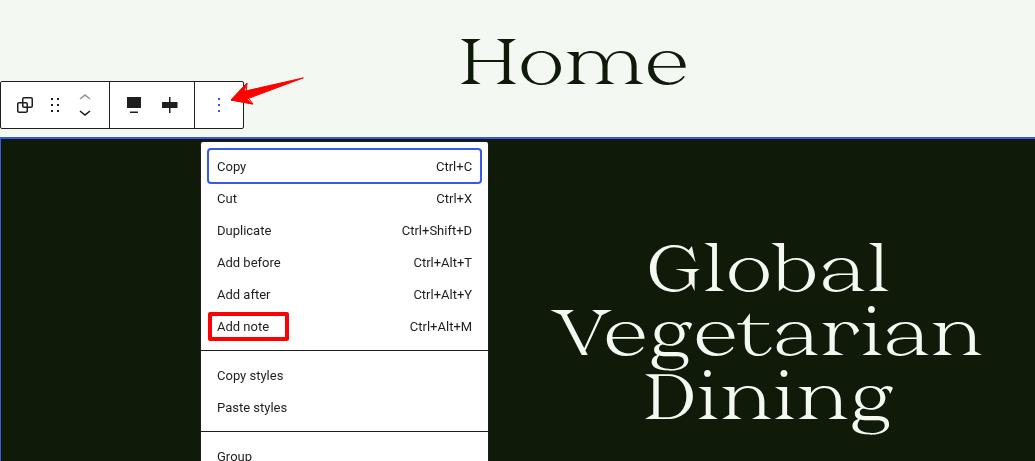
With WordPress 7.0, the Notes feature evolves from a simple commenting tool into a full in-editor collaboration system, making it much easier for teams to communicate, review, and finalize content without leaving WordPress.
The foundation for this was introduced in WordPress 6.9, where users could add comments to individual blocks, reply in threads, and resolve discussions. WordPress 7.0 builds on this and makes Notes far more precise, interactive, and workflow-friendly.
- Inline (Fragment) Comments: Instead of commenting on an entire block, you can now highlight specific text within a paragraph and leave feedback directly on that selection. This brings WordPress closer to tools like Google Docs, where comments are tied exactly to the content in question.
- @Mentions for Team Collaboration: You can tag specific users inside a note using @mentions. This instantly notifies them, eliminating the need to switch to external tools like Slack or email just to get someone’s attention.
- Suggestions Mode (Proposed Edits): Reviewers can suggest changes directly within the content. Authors can then accept or reject these suggestions with a click, making the editing and approval process much more structured and efficient.
- Multi-Block Notes: Feedback is no longer limited to a single block. You can now leave notes that apply to multiple sections, which is especially useful for reviewing entire paragraphs, sections, or layouts.
- Dashboard Visibility: A new dashboard widget surfaces recent notes and discussions across your site, so you can quickly track pending feedback without opening each post individually.
3. AI Capabilities Expand with the Abilities API
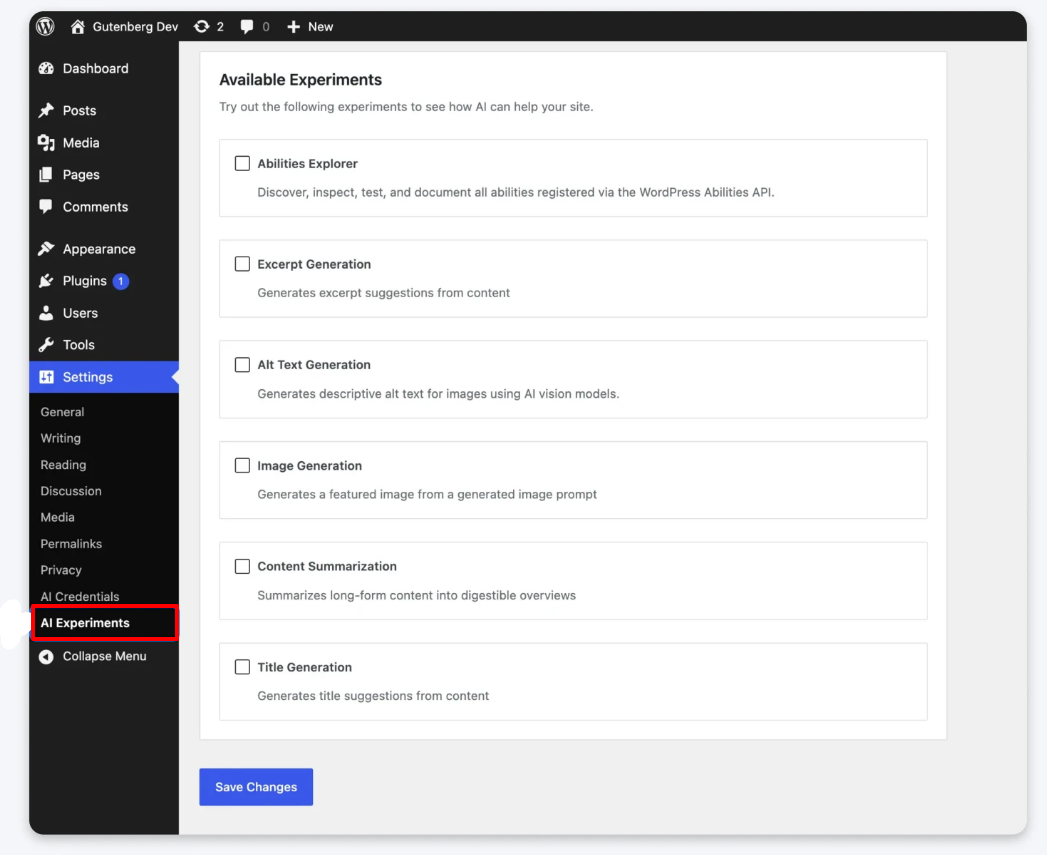
With WordPress 7.0, AI integration takes a major step forward, not by adding one specific AI tool, but by building a flexible system that allows WordPress to work with multiple AI services seamlessly.
WordPress introduces an improved system called the Abilities API, which basically allows your website to connect with different AI tools and use them for tasks like content creation, optimization, and automation.
In simple terms, this means your WordPress site can:
- Connect with AI tools like OpenAI, Google, or Anthropic
- Use AI for generating content, summaries, images, and more
- Automate repetitive tasks without relying on multiple plugins
It provides a standardized way for plugins, themes, and external services to define what they can do, so AI systems can understand and interact with those capabilities in a structured way.
- Hybrid Abilities (Advanced Workflows): Different capabilities can now be combined into more complex workflows. For example, an AI could generate content, optimise it, and format it, all in a single flow.
- Core Abilities: WordPress now includes built-in abilities for common tasks, reducing the need for custom development and ensuring consistency across tools.
- Search & Filtering System: Developers and tools can now easily query and filter available abilities, making it simpler to find and use the right functionality.
- Client-Side Abilities Package: A new JavaScript library (@wordpress/abilities) allows developers to discover and execute these capabilities directly from the frontend, making integrations faster and more dynamic.
Ready for a Better Experience?
WordPress 7.0 gives you better tools, but results depend on your setup. A strong hosting foundation makes everything smoother and faster.
4. A Modernized Admin Experience
WordPress is actively replacing the legacy "WP List Tables" (the old backend lists of posts/pages) with a new interface called DataViews.
After years of minimal visual changes, WordPress 7.0 begins a long-overdue refresh of the admin dashboard, focusing not just on looks but also on consistency, usability, and accessibility.
The biggest shift is the move toward a unified design system across the admin panel.
- Consistent UI Elements: Buttons, forms, tables, and controls are being standardized so everything looks and behaves the same across different sections.
- Improved Layout & Visual Clarity: Better spacing, typography, and color usage make the dashboard easier to scan and less cluttered, especially helpful for beginners.
- Modern Data Views & Tables: Admin tables (like posts, pages, and users) are being redesigned to feel cleaner and more structured, improving navigation and content management.
Dedicated Font Management
WordPress 7.0 introduces a central Fonts section under Appearance > Fonts, where you can:
- View installed fonts
- Upload custom fonts
- Manage typography without extra plugins
This is a small but powerful change, especially for users who care about branding and design consistency.
Strong Focus on Accessibility
One of the most important parts of this update is that modernization doesn’t come at the cost of accessibility.
WordPress is working toward WCAG 2.2 (AA level) compliance, which ensures:
- Proper color contrast for readability
- Full keyboard navigation support
- Compatibility with screen readers
Even new features like blocks and UI components are being reviewed to make sure they remain usable for everyone.
5. New Blocks in WordPress 7.0
WordPress 7.0 pushes the block editor further by adding more native elements, so you can build common layouts without installing extra plugins.
Here are the most useful additions:
- Tabs: Helps you split content into sections without making the page long
- Breadcrumbs: Adds navigation paths for better UX and SEO
- Slider (Upcoming): Showcase images or testimonials in a rotating format
- Popup/Dialogue (Upcoming): Create simple popups directly inside the editor
- Icons (Upcoming): Add visual elements without external libraries
- Table of Contents (Upcoming): Automatically structure long articles
Some of these are still under development, so they may not all be included in the final core version.
6. Responsive Editing
WordPress 7.0 takes a practical step toward real responsive design inside the editor, instead of relying on CSS tricks or page builders.
The key improvement is block visibility control by device. You can choose to show or hide specific blocks on:
- Mobile
- Tablet
- Desktop
This makes it much easier to adjust layouts based on screen size without touching code.
WordPress is also building toward more advanced responsive features in upcoming updates, such as:
- Editing styles separately for different screen sizes
- More control over how layouts behave across devices
- Flexible breakpoints for better design precision
7. PHP 7.2 & 7.3 Support Removed
With WordPress 7.0, the platform officially drops support for older PHP versions and now requires PHP 7.4 or higher.
If your website is still running on PHP 7.2 or 7.3, you won’t be able to upgrade to WordPress 7.0. Instead, your site will stay on the previous version (6.9), where you’ll still receive security updates, but no new features or improvements.
Along with PHP 7.4, WordPress 7.0 officially raises the minimum database requirement to MySQL 8.0 (or MariaDB 10.6). Many older shared hosting environments still use MySQL 5.7.
This change comes because usage of these older PHP versions has dropped significantly, making it practical for WordPress to move forward with better performance and modern capabilities.
8. Performance Improvements
Along with visible features, WordPress 7.0 also brings important performance improvements that directly affect how fast and smoothly your website works.
One of the key upgrades is a faster block editor experience. Editing content now feels more responsive, with reduced lag when working on large pages or complex layouts. This is especially noticeable for users managing long-form content or dynamic pages.
WordPress 7.0 also improves how blocks are rendered and loaded. Instead of loading everything at once, the system handles content more efficiently, which helps:
- Reduce unnecessary load on the browser
- Improve overall page responsiveness
- Make editing smoother, even on lower-end devices
WordPress 7.0 is shifting some heavy media processing tasks to the background, improving overall performance and responsiveness. Another important improvement is better handling of scripts and styles, ensuring only necessary resources are loaded for a cleaner and faster experience.
Conclusion
WordPress 7.0 is not just another update, it marks a clear shift in how websites are built and managed.
Instead of focusing only on new features, this version improves the entire workflow:
- Collaboration becomes easier with real-time editing and Notes
- AI starts playing a practical role in content and automation
- Built-in blocks reduce the need for extra plugins
- Performance and responsiveness continue to improve
At the same time, it also sets new expectations. Better hosting, updated PHP versions, and optimized setups are now more important than ever to fully benefit from these changes.
WordPress is evolving from a traditional CMS into a modern, flexible website-building platform.
If you’re running a growing website, managing a team, or planning to scale, WordPress 7.0 gives you the tools to do it more efficiently—provided your setup is ready for it.
FAQs About WordPress 7.0
1. Is WordPress 7.0 officially released?
WordPress 7.0 is in development, and some features may roll out gradually. Final release timelines can vary, so it’s best to follow official updates before upgrading.
2. Should I upgrade to WordPress 7.0 immediately?
Not necessarily. If your site depends on multiple plugins or custom setups, it’s better to:
- Test on a staging environment
- Check plugin compatibility
- Upgrade once everything is stable
3. Does WordPress 7.0 support AI tools?
Yes, WordPress 7.0 introduces a system that allows integration with AI tools like OpenAI, Google, and Anthropic, enabling features like content generation and automation.
4. Is WordPress 7.0 faster than previous versions?
Yes, it includes backend and editor performance improvements that make content editing smoother and more efficient. However, actual speed also depends on your hosting and optimization.
5. What are the minimum requirements for WordPress 7.0?
WordPress 7.0 requires:
- PHP 7.4 or higher
- Updated plugins and themes
- Compatible hosting environment
6. Will I need fewer plugins in WordPress 7.0?
In many cases, yes. With more built-in blocks and features, WordPress reduces dependency on plugins for common tasks like tabs, breadcrumbs, and layouts.
7. Is WordPress 7.0 good for beginners?
Yes. The improved editor, better UI, and built-in tools make it easier for beginners to build and manage websites without technical knowledge.
8. How does real-time collaboration work in WordPress 7.0?
It allows multiple users to work on the same content with better coordination. However, the feature is still evolving and may be limited in early versions.
About the Author: Jason-Pat
Founder & CTO at AccuWebHosting.com. He shares his web hosting insights at AccuWebHosting blog. He mostly writes on the latest web hosting trends, WordPress, storage technologies, Windows and Linux hosting platforms.


