What is n8n? Complete Guide to Workflow Automation, Pricing & Self-Hosting
Businesses today depend on multiple applications, APIs, and cloud platforms to handle marketing, sales, development, support, and internal operations. As these tools multiply, so does the complexity of keeping data synchronized and processes running smoothly. Repetitive tasks, manual data transfers, and disconnected systems often slow productivity and create operational inefficiencies.
Workflow automation has become a practical solution for reducing manual effort and improving accuracy across teams. Instead of switching between platforms and performing the same actions repeatedly, organizations are increasingly adopting automation tools to streamline processes and improve scalability.
If you’ve been exploring automation solutions, you may have come across n8n. In this in-depth guide, we’ll take a closer look at n8n, its capabilities, key features, and why it’s becoming a preferred choice for developers and businesses seeking flexible workflow automation.
What is n8n?
n8n is a fair-code workflow automation platform that allows you to connect apps, services, and APIs to automate repetitive tasks. It uses a visual, node-based workflow builder where each node represents an action such as retrieving data, processing information, or triggering another service.
The name n8n comes from the word “nodemation” (node-based automation). It is written as n-8-n because eight letters exist between the two “n” characters in the word nodemation. This reflects the platform’s core concept of building automation workflows using connected nodes.
n o d e m a t i o n
↑ 8 letters ↑
n ------------------ n
Created by Jan Oberhauser in 2019, n8n was designed to give developers and businesses a more flexible and cost-effective alternative to traditional automation tools like Zapier. Unlike many cloud-only automation platforms, n8n can be self-hosted, allowing businesses to run their own n8n server and maintain full control over automation workflows and data.
With hundreds of integrations and API support, n8n enables teams to automate everything from marketing and customer management to DevOps and AI workflows. Its low-code approach allows non-technical users to build automation visually, while developers can extend workflows with custom code when advanced logic is needed.
Enjoying this guide?
Launch your Self-Hosted n8n server today and get 50% OFF.
How does n8n work?
n8n works by creating automated workflows made of connected nodes. Each node performs a specific task, such as receiving data, processing it, or sending it to another service. When a workflow is triggered, n8n executes each node step-by-step until the automation process is completed.
1. Workflow Creation
The first step in n8n is creating a workflow using its visual editor. A workflow is a sequence of connected nodes that define how data flows and what actions should be performed. Each node represents a particular operation, such as retrieving data from an API, transforming information, or sending a message to another application.
A typical workflow contains:
- Trigger Node – starts the workflow
- Processing Nodes – handle data operations
- Action Nodes – perform tasks like sending notifications or updating records
Example:
Webhook Trigger → Fetch API Data → Process Information → Send Notification
2. Trigger Starts the Workflow
Every workflow begins with a trigger, which determines when the automation should start. Triggers allow workflows to run automatically whenever a specific event occurs.
Common trigger types include:
- Webhook trigger – starts when an external request is received
- Schedule trigger – runs at specific times using cron jobs
- Application events – triggered when activity occurs in another service
- Manual trigger – started directly by the user
Example:
New Form Submission → Start Workflow
3. Nodes Process the Data
Once the trigger activates the workflow, data moves through multiple nodes. Each node processes the information and passes the result to the next node.
Nodes can perform tasks such as:
- Fetching data from APIs
- Formatting or transforming data
- Filtering results
- Performing calculations
Bonus Advantage:
n8n handles binary data (images, PDFs, and files) exceptionally well compared to Zapier, making it ideal for advanced automations involving file processing, document workflows, and media handling.
Example:
New Order → Get Customer Details → Format Data
Each step processes the input and sends updated data to the next stage of the workflow.
4. Conditional Logic and Branching
n8n allows workflows to include conditional logic, enabling the automation to make decisions based on data values. This means workflows can follow different paths depending on the result of a condition.
Example:
New Customer Signup
↓
Check Email Domain
↓
Business Email → Add to CRM
Personal Email → Send Welcome Email
This feature allows workflows to become more dynamic and adaptable.
5. Integrations with Apps and APIs
One of the most powerful aspects of n8n is its ability to integrate with many services. It supports hundreds of built-in integrations and can connect to any platform that offers an API.
Common integrations include:
- Google Sheets
- Slack
- GitHub
- Notion
Example:
New GitHub Issue → Create Task in Notion → Send Slack Notification
This allows teams to automate processes across multiple tools from a single workflow.
6. Credentials and Secure Access
To communicate with external services, n8n uses credentials such as API keys or OAuth tokens. These credentials are securely stored within the platform and reused by nodes when connecting to external systems. This ensures that integrations remain secure while allowing workflows to access the necessary services.
7. Workflow Execution Engine
Behind the scenes, n8n uses a workflow execution engine that manages how workflows run. The engine starts the workflow after a trigger, moves data between nodes, monitors execution progress, and logs activity. This system ensures that automation tasks run reliably and can be tracked for troubleshooting or performance monitoring.
8. Error Handling and Retry
n8n includes built-in error-handling features. If a node fails, the system can retry the operation, trigger an alternative workflow, or send alerts to notify users about the issue.
Example:
API Request Failed → Retry Request → If Still Failing → Send Slack Alert
This helps ensure workflows remain reliable even when external services encounter problems.
9. Custom Code Support
n8n offers a visual workflow builder for creating automations, while also allowing developers to use custom JavaScript when more advanced logic or data processing is required. This flexibility makes it possible to build powerful integrations and handle complex automation tasks beyond standard nodes.
Because n8n is built on Node.js, it runs best in a Linux VPS environment, where developers get the performance, stability, and full server control needed to manage and scale automation workflows efficiently.
10. Deployment and Hosting
n8n can be deployed in several environments. It can run on self-hosted servers, cloud infrastructure, containers, or orchestration platforms. Many organizations prefer self-hosting because it provides full control over data, security, and workflow execution.
Self-Hosted n8n Hosting
Take full advantage of n8n with our self-hosted n8n hosting service. Instead of spending time installing, configuring, and maintaining the platform yourself, you get a ready-to-run environment built specifically for running automation workflows smoothly.
This allows you to focus on building powerful automations while we handle the infrastructure behind it.
Use Cases of n8n
n8n is used to automate tasks between different applications, APIs, and systems. Because it supports hundreds of integrations and custom logic, it can be applied in many areas such as business operations, development, marketing, and data processing.
Below are some of the most common and practical use cases of n8n.
1. Business Process Automation
One of the most common uses of n8n is automating routine business tasks. Companies often connect multiple tools and services so information flows automatically without manual work. For example, when a new lead fills out a form on a website, the workflow can automatically store the information in a database, send a notification to the sales team, and create a task in a project management system.
This type of automation reduces manual data entry and ensures that business processes run faster and more efficiently.
2. Marketing Automation
Marketing teams use n8n to automate campaign-related tasks and customer communication. Workflows can capture leads from landing pages, add them to marketing platforms, send welcome emails, and notify teams when new prospects appear.
For instance, when someone submits a form, n8n can automatically add the contact to Mailchimp, store their details in Google Sheets, and send a notification through Slack. This helps marketing teams manage leads and campaigns more effectively.
3. DevOps and IT Automation
Development and IT teams frequently use n8n to automate operational workflows. It can monitor events, trigger alerts, manage deployments, and integrate development tools into a single automated process.
For example, when a new issue is created in GitHub, n8n can automatically create a task in a project management tool, notify developers in Slack, and log the issue details for tracking. This helps teams stay informed and respond quickly to system events.
4. Data Synchronization Between Apps
Many organizations use multiple tools to manage their operations. n8n helps keep data synchronized between these systems by automatically transferring or updating information whenever changes occur.
For example, when new customer data is added to a CRM system, n8n can update records in Airtable, add details to Notion, and send confirmation notifications. This ensures that data remains consistent across platforms without manual updates.
5. AI and Automation Workflows
n8n is increasingly used to build automation around artificial intelligence tools. Workflows can send text, images, or data to AI services, process the results, and trigger actions based on the output.
For example, a workflow can receive text from a form, send it to OpenAI for analysis, store the processed data in a database, and send a report to a team channel. This allows companies to automate AI-powered tasks such as content analysis, chatbot responses, and document processing.
6. Customer Support Automation
Customer support teams use n8n to automate ticket handling and communication workflows. For example, when a support request is submitted, the workflow can automatically create a ticket, categorize the request, notify support agents, and send confirmation emails to the customer.
This reduces response times and ensures support teams can handle requests efficiently.
7. Notifications and Alerts
n8n is also widely used for real-time notifications. Businesses can create workflows that monitor important events and send alerts when specific conditions occur.
For example, if a server experiences downtime or a critical event occurs in an application, n8n can send instant alerts through Slack, email, or messaging platforms so teams can take action quickly.
Real Example: E-commerce Order Processing
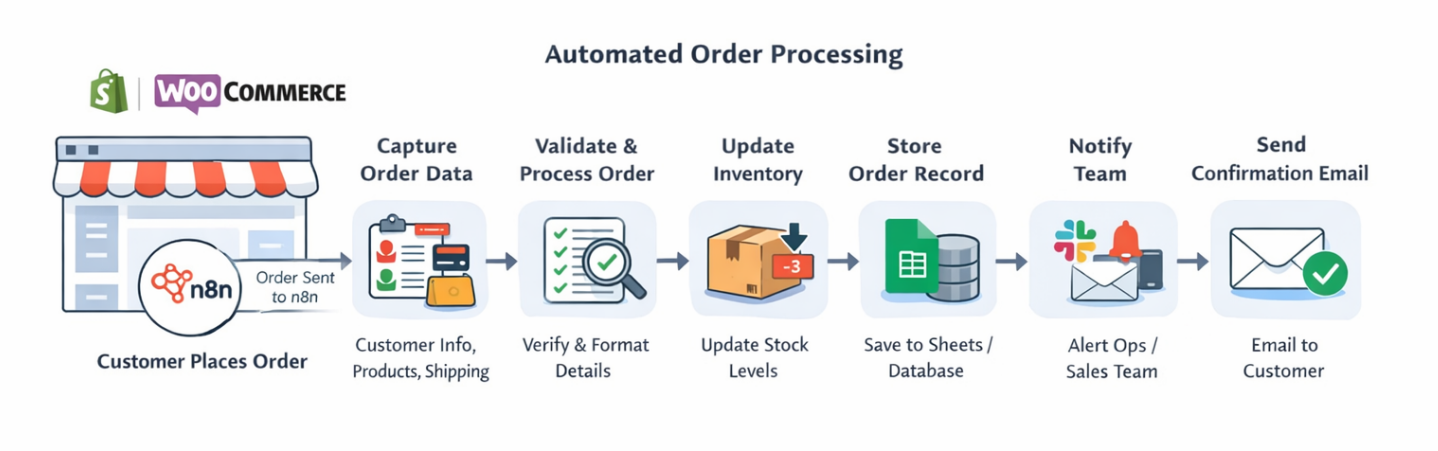
The automation process starts when a customer places an order on an e-commerce platform such as Shopify or WooCommerce. The platform sends order details to n8n, which then runs an automated workflow to manage the order.
Typical automated steps include:
- Receive order data automatically – n8n captures order details such as customer information, purchased products, quantity, pricing, and shipping details as soon as the order is placed.
- Validate and process order information – the workflow checks the order details, formats the data properly, and ensures that payment and product information are correct before continuing.
- Update product inventory – once the order is verified, the system automatically reduces the available stock for the purchased items to keep inventory records accurate.
- Store order records for tracking – order details can be saved in tools like Google Sheets or internal databases so sales and accounting teams can easily track purchases.
- Notify the operations or sales team – the workflow sends an instant notification through communication platforms such as Slack, allowing the team to begin packaging and shipping the order.
- Send order confirmation to the customer – the workflow automatically sends an email confirmation with order details, payment confirmation, and delivery information.
Using automation like this helps e-commerce businesses process orders faster, reduce manual work, and provide better communication with customers.
Conclusion
n8n has become one of the most powerful workflow automation platforms for developers, businesses, and automation enthusiasts who want to connect apps, automate tasks, and build complex workflows without heavy coding. While the official n8n Cloud service provides a convenient managed solution, its pricing plans come with execution limits that may become restrictive as your automation needs grow.
Because n8n is Fair-code, many users prefer running self-hosted n8n servers, which provide complete control over workflows, integrations, and data privacy without monthly execution restrictions. By hosting n8n on your own infrastructure, you can scale resources as needed and customize the automation environment to fit your requirements. If you want a simple and affordable way to run your own automation server, our Self-Hosted n8n VPS hosting starts at just $4.95 per month, giving you a reliable platform to build and run unlimited workflows while maintaining full control over your automation system.
Frequently Asked Questions
1. What is nodemation (n8n)?
n8n is a Fair-code workflow automation platform that allows users to connect apps, APIs, and services to automate repetitive tasks. It provides a visual workflow builder where users can design automation processes without extensive coding while still allowing developers to create advanced logic when needed.
2. Does n8n charge per task like Zapier?
No. When you use self-hosted n8n, there are no task-based charges. Unlike Zapier, which charges for every automation task executed, n8n only requires you to pay for the VPS or server where it is hosted. This means you can run unlimited workflows and tasks without worrying about increasing monthly automation costs.
3. Can n8n be self-hosted?
Yes, n8n can be self-hosted on your own infrastructure such as a VPS, cloud server, or dedicated server. Self-hosting gives users complete control over their workflows, removes execution limits, and allows deeper customization of integrations and automation processes.
4. How much does n8n cost?
n8n offers both cloud and self-hosted options. The official n8n Cloud plans typically start at around $20 per month with execution limits, while self-hosting can be much more affordable depending on the server you use. Our self-hosted n8n VPS can start at $4.95 per month, providing a cost-effective way to run automation workflows.
5. What are n8n workflows?
n8n workflows are automation pipelines that connect different applications and services. Each workflow consists of nodes that trigger actions, process data, and interact with external APIs to automate tasks such as sending emails, updating databases, or syncing data between platforms.
6. What can you automate with n8n?
n8n can automate many business and development tasks, including marketing automation, data synchronization, customer notifications, API integrations, social media posting, order processing, and AI-powered workflows that connect multiple services.
7. Is n8n good for developers?
Yes, n8n is very popular among developers because it combines a visual automation builder with the ability to write custom JavaScript code. Developers can create advanced workflows, connect to custom APIs, and extend functionality using community or custom nodes.
8. What is the advantage of self-hosting n8n?
The biggest advantage of self-hosting n8n is full control over automation workflows and infrastructure. Users can run unlimited workflows, install custom nodes, control data privacy, and scale the server resources as automation workloads grow.
9. Do I need a server to run n8n?
Yes, n8n requires a server environment to run. It can be deployed on a local machine, cloud instance, or VPS. Many users prefer running it on a VPS because it provides reliable uptime, remote access, and enough resources to handle automation workflows
10. How do I host n8n easily?
The easiest way to host n8n is by using a preconfigured VPS or managed hosting service where n8n is already installed and optimized. This allows users to start building automation workflows quickly without dealing with complex installation or server configuration.
11. Can n8n run scheduled workflows?
Yes, n8n allows users to schedule workflows using triggers such as cron jobs or time-based triggers. This means you can automate tasks that run at specific times or intervals, such as sending reports, syncing databases, or performing regular system checks.
About the Author: Jason-Pat
Founder & CTO at AccuWebHosting.com. He shares his web hosting insights at AccuWebHosting blog. He mostly writes on the latest web hosting trends, WordPress, storage technologies, Windows and Linux hosting platforms.
This is a well-structured guide to n8n, especially for beginners who want to understand how workflow automation actually works. I found the e-commerce order processing example particularly useful because connecting Shopify with n8n can automate tasks like order tracking, inventory updates, and team notifications. The explanation of self-hosting and custom code support also makes the platform’s flexibility much clearer.